 Cui
Anthropic published Building always-on agents (William Hu, Claude Platform best-practice guides). It was brought to my attention through a Chinese-language summary on X by @shao__meng. This post is my own English summary of the original; the claims are Anthropic’s, the commentary at the end is mine.
A full English translation of the @shao__meng article, with redrawn English diagrams, is here.
The key reframe
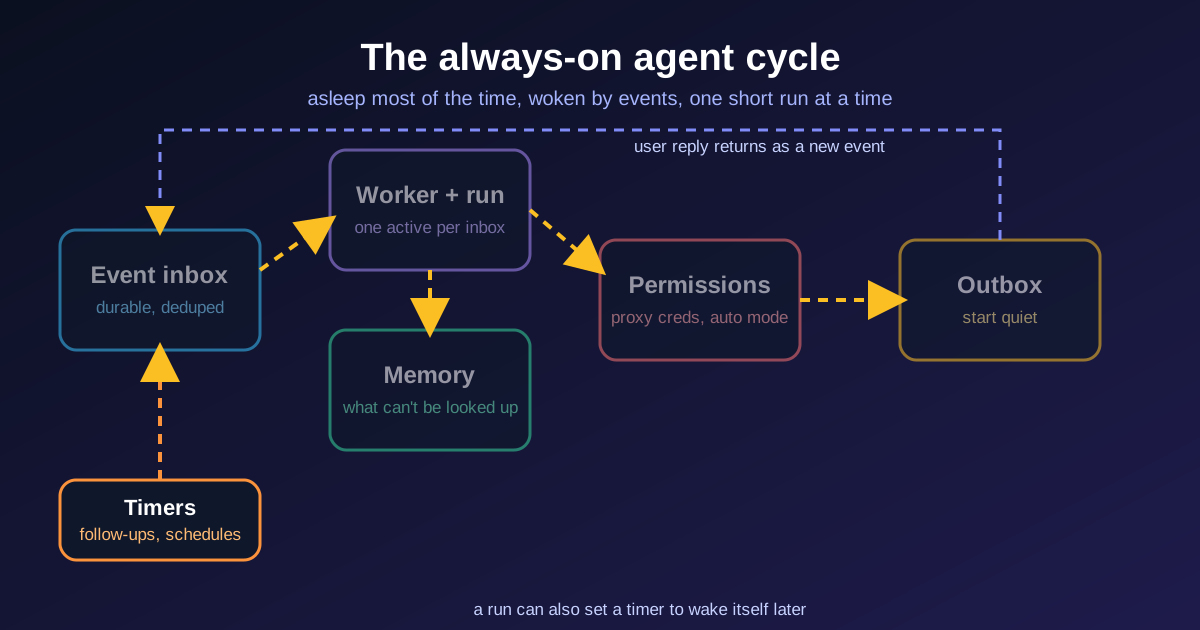
“Always-on” describes the user experience, not the runtime. The agent is asleep most of the time. Each stretch of work is a run: it receives an event, does its task, saves what happened. A run lives in a session, the transcript of messages and tool calls. Then it sleeps again, and the cycle repeats. Underneath it is the same core loop as any agent (see Building effective agents). What differs is the architecture around the loop: when it wakes, what carries over, and how results reach the user.
Anthropic attributes the recent resurgence to two model changes: better judgment about user intent and when to check in, and cheaper intelligence. Its example is that on one long-horizon coding benchmark Opus 5.5 cost 78% less per solved task than Opus 5, against 40% less on typical workloads. That is Anthropic’s own figure on a subset benchmark, so treat it as indicative.
The five primitives
1. Event inbox
Letting each source call the agent directly can cause competing runs when two events collide, and a crash can lose the event. Instead every source writes to an inbox and a worker picks events up. Minimal version: a durable event table, an HTTP handler that writes to it, and a background worker that reads from it. Track status per event and deduplicate on the source’s unique ID. Start with one inbox per user.
Rules worth copying:
- The handler acknowledges fast (webhook providers treat slow responses as failures). Deeper checks such as prompt-injection screening happen during the run.
- The inbox is the source of truth. If a worker dies mid-run, a new one retries the same event.
- One active worker per inbox. For an event that arrives mid-run: push it to the next run, fold it into the current one, or interrupt and restart.
- Batch pending events, so several quick user messages become one run and one reply.
2. Timers
Inbox plus timers is what makes an agent feel proactive. Two kinds: follow-ups (a deadline the agent sets itself, such as checking for a reply) and schedules (recurring work such as a daily briefing). They live in their own durable store, because the inbox should only hold events ready to be worked on. Timers never start runs themselves: a scheduler polls for due items, marks follow-ups done or advances schedules to the next occurrence, then adds an event to the inbox and wakes the worker. Build the scheduler or use a durable execution engine.
3. Memory
Runs are disjointed, so memory gives continuity, in its own durable store (database or object store) so it outlives the worker. Rule of thumb: store only what the agent can’t look up again, and keep a pointer when the data lives elsewhere, such as an issue tracker. Four kinds:
- User instructions, in their own file, loaded every run, because the user won’t always be around to steer.
- User notes: role, preferences, corrections. One file at first, then an index plus small files.
- Past messages, so nothing is repeated.
- Task progress, one file per task: what is done, what remains.
An optional dreaming pass reviews past sessions to replace outdated entries and find patterns that only show across many runs. Each run pays the context overhead of system prompt, tool definitions and memory, so keep it lean and use prompt caching. If a session grows too long, compact or start a new one; both lose detail, so write what must persist to memory during the run.
4. Permissions
Where the risk concentrates: a run holds the user’s access and operates unattended. Per tool call the agent proceeds, is blocked, or waits for approval. Three practices are emphasised:
- Credential proxy. A proxy outside the agent’s environment injects real credentials into outgoing requests, so the agent never holds them.
- Auto mode. Classifiers review higher-risk actions and block the ones they identify as dangerous so the model finds a safer path; humans still review the most important decisions.
- Deferred tool calls. The run ends and the session is saved mid-call. The request is shown to the user, for example as an interactive card via MCP Apps, and the answer returns as an inbox event that resumes the session. Meanwhile the worker handles other events, so the worker can keep handling other events.
5. Outbox
Always-on agents work in the background, so the user gets the outcome, not the stream of steps. A run ends in one of three ways: a message to the outbox, a decision that nothing needs sending, or a deferred call asking for permission or input. A simple “send” tool is often enough. A formal outbox (a table plus a dispatcher mirroring the inbox and worker) is for pacing messages or recovering from delivery errors. Tune message volume with evals, and start quiet, then earn more of the user’s attention.
How it closes into a loop
A run can set a timer that wakes the agent later, and the user’s reply comes back as an inbox event. Each run is short; the cycle is what feels always-on.
My take
- The inbox is the first thing to build. Single source of truth, one worker, merged bursts: these decide whether you survive webhook retries and concurrent events. None of the primitives is novel alone, and teams already stitch queues and cron together. The value is the clear division of responsibilities.
- Memory discipline is cheap and high-leverage. “Only what you can’t look up” plus a separate instructions file prevents both bloat and drift.
- Permissions are the launch gate. Credentials outside the agent and deferrable approvals should be defaults, not retrofits.
- Outbox is a product decision. Many teams ship the opposite, noisy first and quieter later.
- This is close to what I run day to day. My own setup (OpenClaw) already has heartbeats and cron as timers, daily memory files plus a curated long-term file, and a human-in-the-loop step before anything external. Reading the guide, the missing piece in most personal setups is a real inbox with deduplication and a single worker, which is where I’d look first for robustness gains.
Source: Building always-on agents, Anthropic.
 Flint-interactive: Giving Agents a Language for Interactive Charts

Click to load Disqus comments