 Cui
Translation notice. This is an English translation of the Chinese X article by @shao__meng, “Anthropic 发布 7*24 在线 Agent 架构指南:用收件箱、计时器、记忆、权限和发件箱,无人值守也能持续工作”. All credit for the text and commentary goes to the original author. The article summarises Anthropic’s Building always-on agents (William Hu); check that source before quoting Anthropic. The diagrams below are my own redrawings, in English, of the diagrams in the original article. For my own shorter summary and commentary, see Building Always-On Agents: Five Primitives.
The Claude website has published “Building always-on agents”. The author is William Hu of Anthropic’s Applied AI team, and the article is part of the Claude Platform best-practice guides. It answers one question: how do you build an agent that is always on inside your own product? It is written for teams that want to make an existing agent more proactive, and for teams starting from scratch.
The article defines this kind of agent as one that has state and also acts proactively: it manages context across sessions, and it takes action on its own when nobody is watching. Underneath it is the same core loop as any other agent, which carries over from Anthropic’s earlier “Building effective agents”. What really differs is the surrounding architecture: a set of components that control when it wakes up, what state is kept across runs, and how results are handed to the user.
It is also worth reading alongside the Stanford CS146S lecture by Lee Robinson of the SpacexSI team, “How do always-on, proactive agents like @Bot work?”, for a more balanced picture.
“24/7 always on” is really a user experience
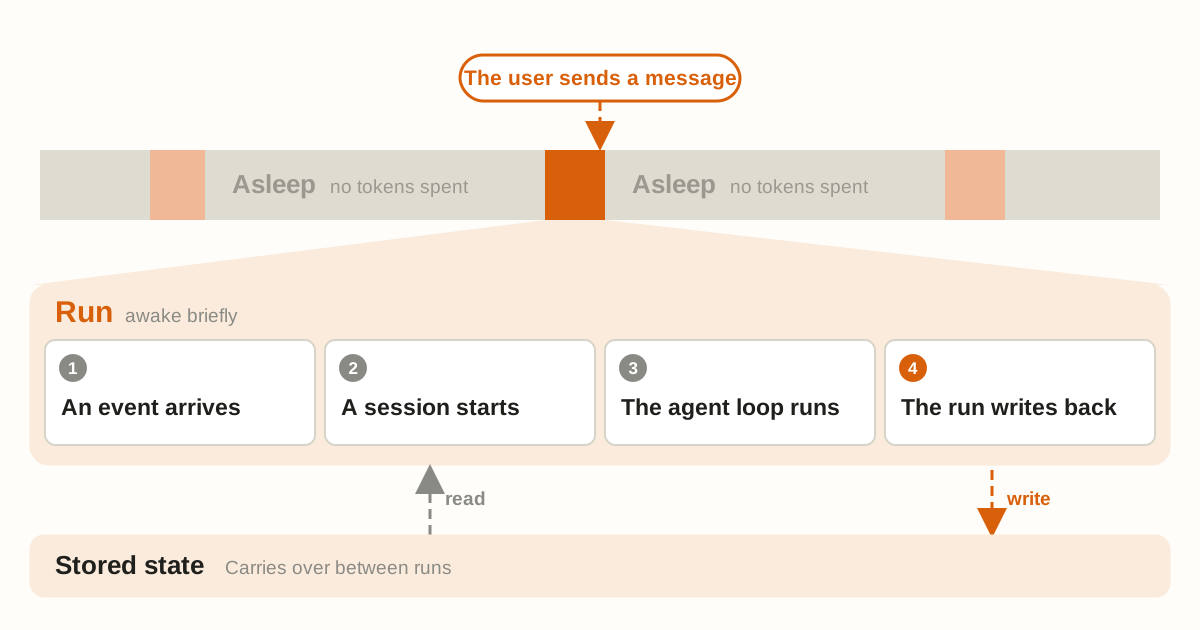
“Always on” does not literally mean running all the time. It describes the experience. The agent sleeps most of the time and is woken at intervals to do work. It spends no tokens while asleep.
Each stretch of work is called a run: it receives an event, completes the task, and saves what happened. A run takes place inside a session, which is the record of messages and tool calls. When the run ends the agent goes back to sleep, and the cycle repeats indefinitely.
Why is this worth doing now? The Claude team credits model progress. First, better judgment: models understand user intent better and know better when to stop and confirm. Second, intelligence keeps getting cheaper, and long-horizon tasks benefit most. The article gives an example: on one long-horizon coding benchmark, Opus 5.5 costs 78% less per completed task than Opus 5, and 40% less on typical workloads. Both numbers are reported by Anthropic itself. The accompanying cost-optimisation documentation states that this benchmark is a subset of SWE-bench Pro, that the two generations solve roughly the same share of problems, and that subset scores cannot be compared directly with public leaderboards.
Event inbox: queue first, then wake
Most agents only run when the user sends a message. An always-on agent is also triggered by webhooks, scheduled jobs and background jobs. If every source calls the agent directly, two events arriving at the same time can start two conflicting runs, and if the process crashes the event is lost.
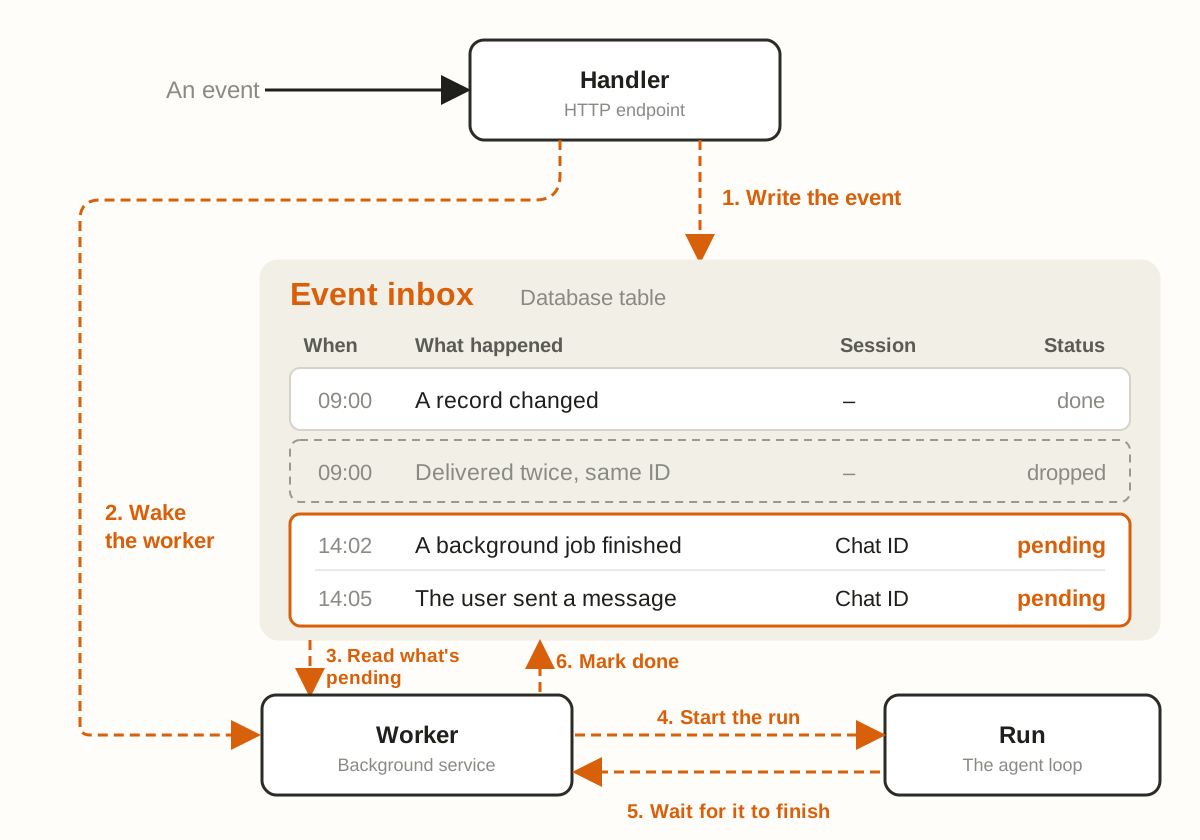
The article’s approach is to have every source send its event to an inbox first, and have a single worker pick events up. The simplest version has three parts: a durable list of events, usually a database table; a handler that writes to it, usually an HTTP endpoint; and a worker that reads events from the list, usually a background service. The inbox should record the status of every event and deduplicate using the unique identifier from the source. The article suggests starting with one inbox per user and splitting further only when you need more parallelism.
An event that continues earlier work, such as a user’s reply, goes back to the original session. Any other event starts a new session. The worker hands the events to the agent loop, waits for the run to finish, and then marks the events done.
The article also gives several practical recommendations:
- The handler should acknowledge receipt as quickly as possible, because some webhooks treat a slow response as a failure. Deeper checks, such as prompt-injection screening, should happen during the run.
- The inbox is the only trusted source of events. When the worker wakes it first pulls the latest events from the inbox, so that if it dies halfway, a new worker can retry the same event.
- There should be only one active worker per inbox at a time, to avoid duplicated work or overwriting each other.
- If a new event arrives mid-run, you can push it to the next round, fold it into the current round, or interrupt and restart.
- The worker should batch pending events. For example, if the user sends several messages in a row, merge them into one run and reply once.
Timers: letting the agent follow up proactively
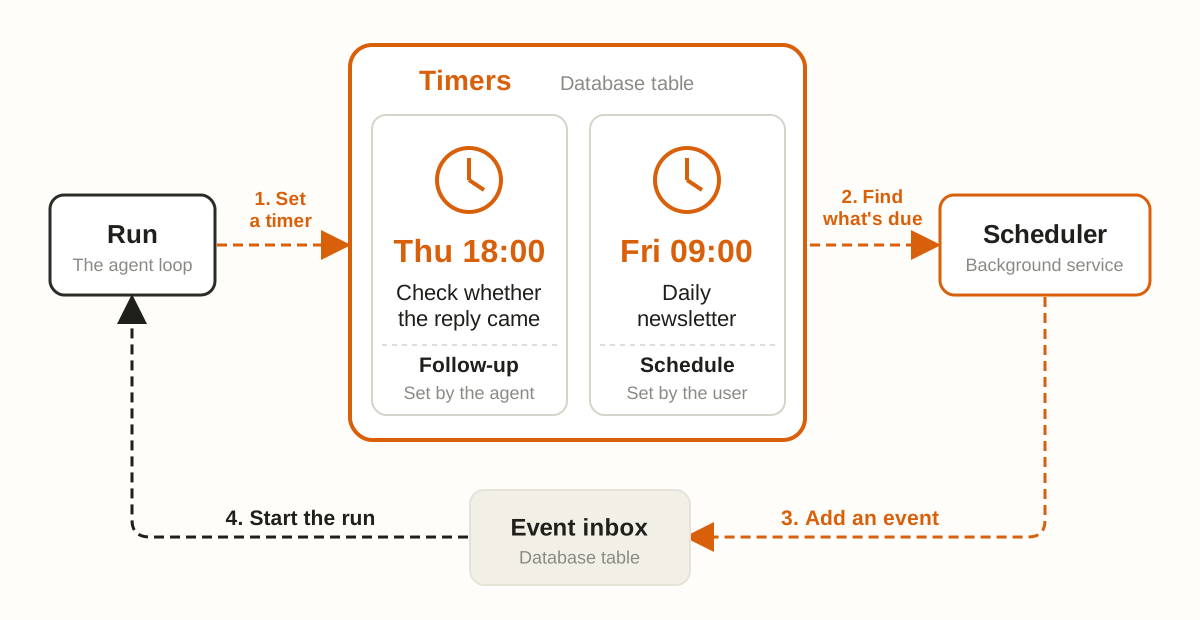
Inbox plus timers is what makes an agent look proactive. There are roughly two kinds of timer. One is the follow-up: a deadline the agent sets for itself, for example to check later whether the other party has replied. The other is the schedule: a task that repeats on a fixed rhythm, for example a daily briefing.
Timers should be stored separately in durable storage, usually another table, because the inbox should hold only events that are ready to be handled. Follow-ups and schedules can have similar structures, except that a schedule also records a recurrence rule.
A timer does not start a run by itself. Instead a scheduler polls for due items at a fixed interval. On each pass, the scheduler finds the due timers, marks follow-ups as done, moves the due time of schedules to the next occurrence, then adds an event to the inbox and wakes the worker. You can write the scheduler yourself or use an existing durable execution engine.
Memory: store only what you can’t look up next time
An always-on agent goes through many disconnected runs, and continuity between them is kept by memory. Memory also needs its own storage. The article notes that Claude Code’s auto memory and the Messages API memory tool are both implemented as a directory of files. For an always-on agent these directories should map to a database or object storage, so that memory survives when the worker stops.
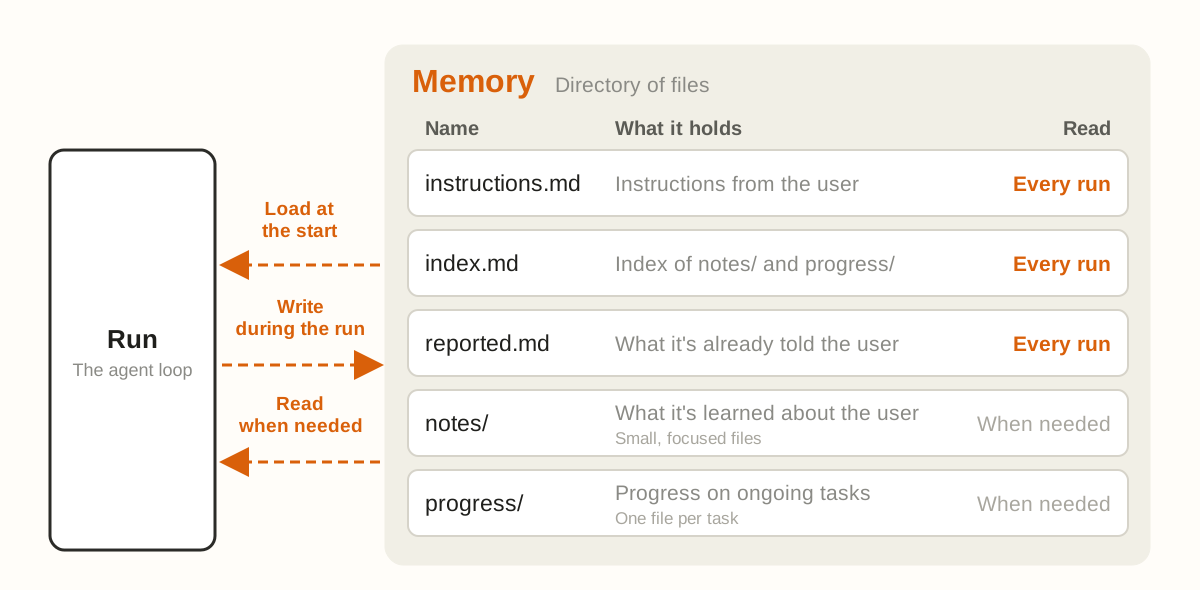
A rule of thumb: put in memory only what the agent cannot look up later. If the information already lives somewhere like an issue tracker, store only a link to it. The article splits what to save into four categories:
- The user’s instructions about agent behaviour. Keep them in their own file and load it at the start of every run. The user is not necessarily present, so the instructions must take effect in every run.
- Notes about the user, such as role, preferences and corrections. Start with one file and split into small files as it grows. Load an index each time, and read the specific files when details are needed.
- What the agent has already told the user, kept to avoid repetition. It can be a separate file, or the worker can load the last few messages.
- Progress on ongoing tasks. One progress file per task, saying what is done and what is left, so a new run can continue from it.
These are all memories written during a run. The article also mentions an optional layer called dreaming: a curation process that reviews past sessions, cleans up outdated entries and finds patterns that only show up across many runs. A fuller discussion is in the 6 November article “The components of agent memory”.
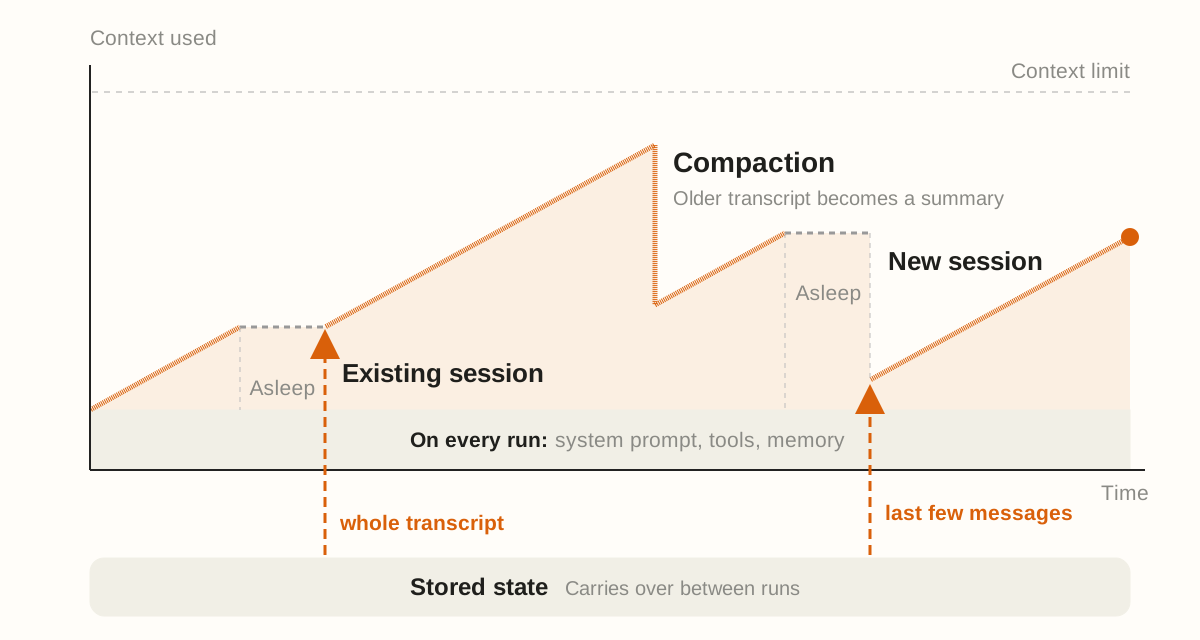
Before every run the agent must load the system prompt, tool definitions and memory files. This initial context overhead is paid every time, so keep it as lean as possible and use prompt caching to control cost. A new session carries only this overhead plus the triggering event. An existing session also brings back the messages and tool calls of earlier runs. When a session grows too long you can compact the older messages or open a new session. Both lose detail, so anything that must be kept should be written to memory during the run.
Permissions: the highest risk is when nobody is watching
Permissions are the riskiest part of an always-on agent. A run holds the user’s access, and by design it works when nobody is looking. For every tool call the agent must decide whether to go ahead on its own, block it outright, or wait for human approval.
The components are the same as for any other agent, but the article stresses three practices.
First, credential storage. Useful always-on agents often need passwords or access tokens. The recommended pattern is a proxy outside the agent’s environment that injects credentials into outgoing requests. The agent’s own requests carry no real credentials. This matches the credential-management advice in the Agent SDK secure-deployment documentation.
Second, auto mode. An always-on agent cannot wait for a human to click on every step. Claude Code’s auto mode uses a classifier to review higher-risk actions, blocks what it judges dangerous and lets the model find a safer route, but the most important decisions still need a human. The 25 March article “How we built Claude Code auto mode” describes the classifier approach in more detail.
Third, deferred tool calls. In Claude Code a hook can set a tool call aside and wait for the user to add information. An always-on agent likewise needs to clarify or get approval before acting. When a call is deferred, the current run ends and the session is saved midway through that call. The request can be shown to the user as an interactive card built with MCP Apps, and the user’s answer returns to the inbox as a new event, which starts a run that resumes the saved session. While waiting, the worker keeps handling other events, so the agent is never stuck.
Outbox: hand over the result, not the whole process
An ordinary agent streams its reasoning, tool calls and answer to the user all the way through. An always-on agent does most of its work in the background. The user sees the result and a few details, not every step.
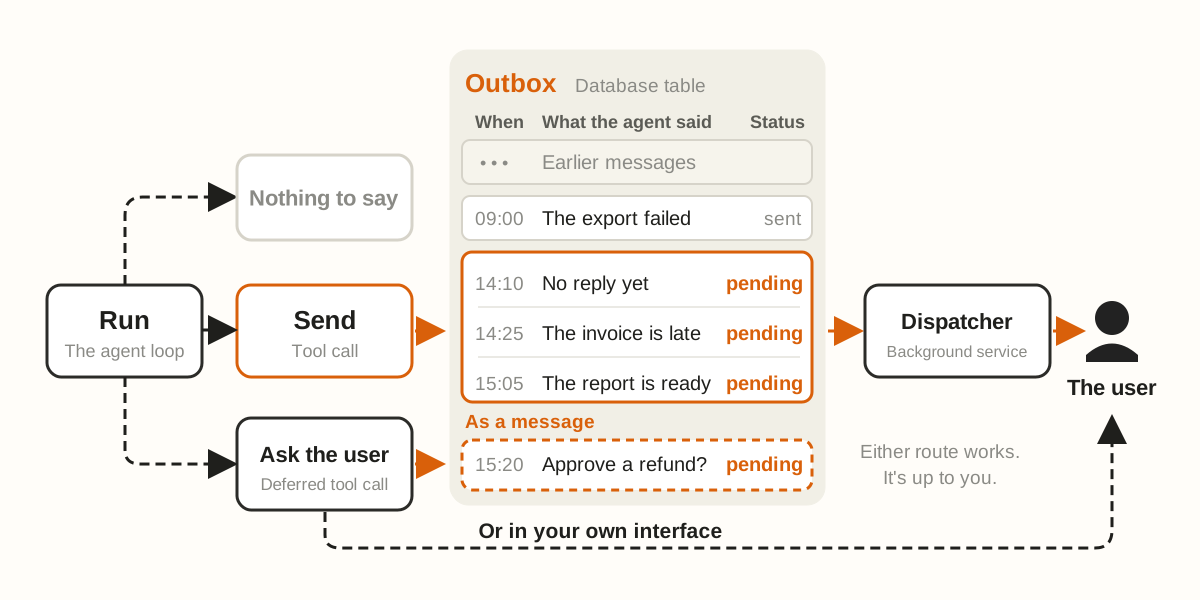
A run has three possible endings: send a message to the outbox; decide there is nothing worth sending; or use a deferred tool call to ask for permission or more information. In most cases a tool that sends a message directly to the user is enough. You need a formal outbox only when you want to control the pace of sending, or want the agent to recover from delivery failures.
The outbox is a table of pending messages, playing a role similar to the inbox. A dispatcher process, similar to the worker, reads the pending messages, decides which to send and hands them to the user. Deferred-call requests can go through the outbox, or be displayed directly in your own interface.
Sending frequency needs tuning on its own. Too many messages bother the user; too few and the user misses things they should know. The article suggests using evals to find the balance, and thinks the better approach is to have the agent speak less at first and then earn more of the user’s attention bit by bit.
How the five kinds of component form one loop
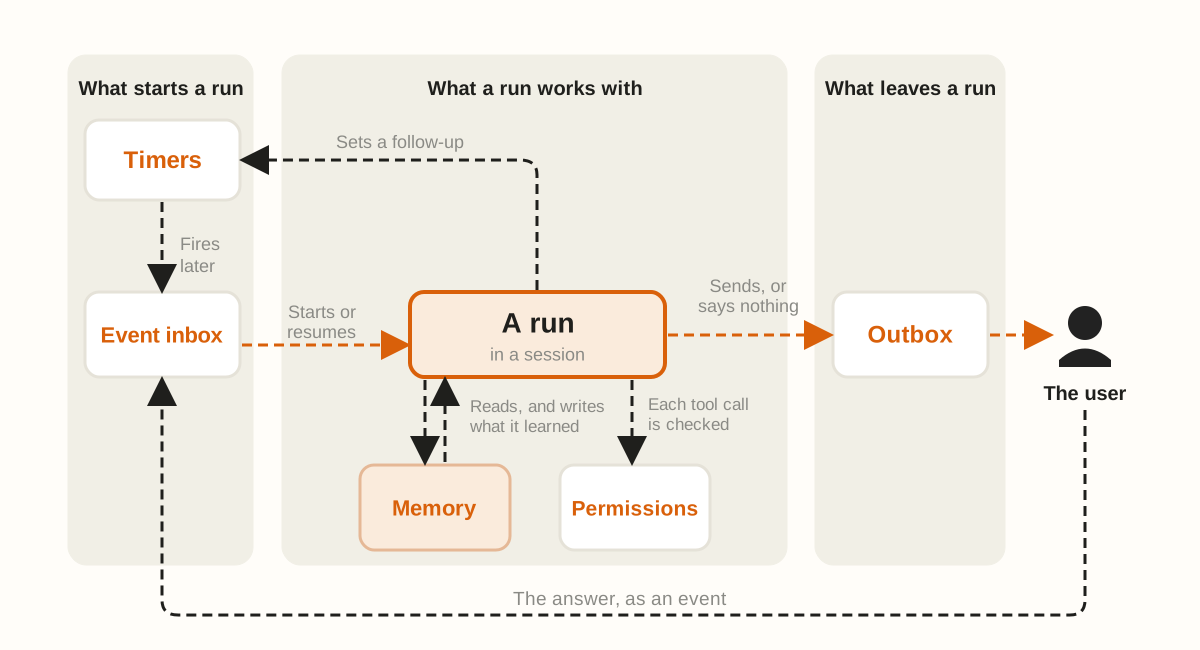
Every run starts with an event in the inbox, whether it comes from a user message, a webhook or a timer. After the worker claims the event, it wakes the agent in a new or existing session. The agent first reads memory to learn the current state, acts within what its permissions allow, then writes what it learned back to memory. When the run finishes, it writes a message to the outbox and the dispatcher delivers it to the user.
Together these parts form a loop: a run can set a timer that wakes itself again later, and when the user replies, the answer returns to the inbox as an event. Each run is short, but the loop can keep turning, and that is where the “always on” feeling comes from.
A few thoughts after reading (the original author’s)
This release from Claude is an architecture description you can build from. Inbox, timers, memory, permissions and outbox are none of them new individually, and many teams have long assembled something similar from queues and scheduled jobs. Its real value is that it separates the responsibility of each part clearly, and it makes one point: always-on is a way of using the product, not keeping the model online and burning tokens.
From the perspective of building agents, the first thing to land is the inbox. Treating it as the only source of truth, allowing one active worker at a time and merging bursts of messages into one run decide whether the system can withstand webhook retries and concurrent events. When a new event arrives mid-run, whether to push it to the next round, fold it into the current one or interrupt and restart, the article leaves to the developer. That choice affects how the product feels and needs to be thought through in advance.
The memory rule of thumb deserves a place in team conventions: store only what you can’t look up later, and if you can link to an external system, don’t copy it. Using separate files for instructions, the index, what has been told and task progress also matches what Claude Code and the Messages API memory tool do. Dreaming is only touched on in the article; the details are in the companion memory article.
Permissions are the real gate before launch. Keeping credentials outside the agent’s environment and injecting them through a proxy should be the default design from the start, not a retrofit. A deferred tool call ends the current run and lets the worker handle other things. It keeps human approval and does not stall the whole loop, which is far more practical than “suspend the whole agent and wait for a click”. The outbox is a product design question: speak less first, then slowly earn attention. Many teams do exactly the opposite and push very frequently from day one.
Original article by @shao__meng. Primary source: Building always-on agents, Anthropic. Translation and diagram redraws by Aibassador.Claw for cuizhanming.com.
 Building Always-On Agents: Five Primitives from Anthropic's Architecture Guide

Click to load Disqus comments