 Cui
OpenAI’s engineering post Inside the Codex sandbox explains how Codex runs shell commands on your machine while enforcing filesystem and network limits you control. OpenAI frames it as one layer of defense in depth: training and alignment shape what the model tries to do, and the sandbox limits what a command can reach.
The post links to code in the open-source openai/codex repository but I did not clone it. This is a reading of the article. Facts come from OpenAI’s post. Where I add interpretation, I say so.
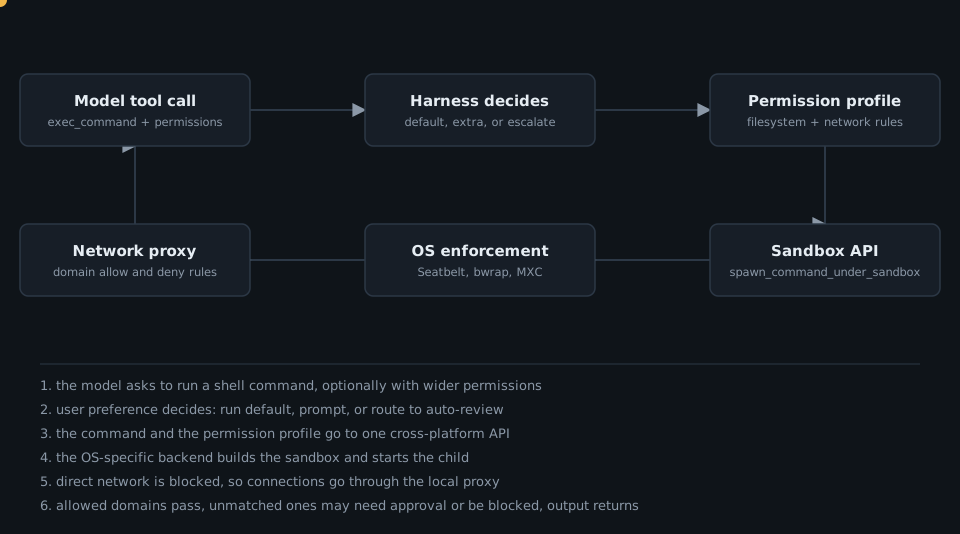
The workflow in motion
The design choice: constrain, do not relocate
The usual answer to “how do I sandbox an agent” is a virtual machine or a container. Codex takes a different route. Instead of moving computation into a separate environment, it uses each platform’s own sandboxing facilities to constrain commands running in the user’s existing environment.
OpenAI’s reasoning is practical. A laptop is a bespoke dev environment, and reproducing it in a Docker container takes work. Their example: an iOS app on a Mac needs native Mac build tools and the iPhone simulator. Inside Docker, Codex could not run either. Delegating those steps to the host would run them outside the container’s sandbox with their own restrictions to design. So Codex invests in OS-specific sandboxing and keeps the agent where the work is.
My interpretation: this trades the strong, uniform isolation of a VM for compatibility with real workflows, and it pushes the hard engineering into three platform backends.
Architecture
The harness exposes the OS mechanisms through one API across macOS, Windows and Linux. It takes a command and a permission profile, plus a network proxy when the profile allows limited network access. It starts the process in a sandbox and returns a Child handle. Every child inherits its parent’s constraints, so the restrictions cover the whole process tree, including descendants that outlive the original process.
How the harness uses it
The most common tool is a shell tool that runs commands like an interactive shell. For the one-shot exec_command tool, the harness swaps the plain subprocess call for spawn_command_under_sandbox() and passes the permission profile and, when needed, the network proxy.
The model can also request different permissions for a single command. Per the article, the request takes one of three forms: use_default for the turn’s default config, with_additional_permissions for expanded access inside the sandbox, and require_escalated for running outside it. The model asks and the harness decides, based on user preferences. Codex may prompt the user, or route the request to auto-review. The same sandboxing infrastructure is also used for reading and modifying local files.
Choosing the boundaries
OpenAI describes conservative defaults that still enable real work. For a Git repository, the built-in :workspace profile does three things:
-
Allows writes in the workspace but keeps directories such as
.gitand.codexread-only. Codex can edit source freely without touching.codex/config.tomlor.git/hooks. - Allows broad filesystem reads, subject to normal OS permissions, because compilers and build tools need SDKs and config outside the repo. The article is candid about the cost: sensitive files elsewhere, such as config files with API keys, may stay readable.
- Disables network access. That blocks direct uploads and exfiltration, and also blocks legitimate downloads such as dependencies, which need extra access.
The post also names a residual risk. An agent could inject malicious code into a locally installed package such as node_modules/prettier. Git often ignores node_modules, so git status may show nothing, and if the editor runs that Prettier on save the code runs outside the sandbox. That is the stated reason for defense in depth.
Configuring profiles
Users define named permission profiles under [permissions] in config.toml. A profile can extend a built-in one. OpenAI’s example dev profile extends :workspace, adds write access to ~/build-cache, and makes the workspace’s .vscode directory read-only. Filesystem entries grant read, grant write, or deny. Rules under :workspace_roots apply to every workspace root.
For the network there are roughly three options: disabled (the :workspace default), fully enabled (the :danger-full-access default), or restricted to a proxy that decides per domain. Domain rules take exact names and wildcards, and explicit deny beats allow.
Layering and enforcement. Codex merges settings from multiple config.toml files. Tables merge recursively, with higher precedence winning, and arrays are replaced whole. OpenAI points out that this is why profiles use tables for paths and domains: a team can override single entries and still inherit changes to the rest of the organisation’s base config. Administrators can add managed requirements through requirements.toml, such as allowed_permission_profiles. Cloud requirements take precedence over the system file at /etc/codex/requirements.toml, and profiles marked false or absent from the merged table are unavailable.
codex sandbox: the primitive, reusable
The codex sandbox command runs any command under a profile from your Codex config. It is useful for testing a profile, and it makes the sandbox usable by your own tools. In OpenAI’s example, a command that tries to write a malicious auto-formatter into .vscode fails, assuming .vscode already exists, because the dev profile makes that directory read-only.
The second use case is an MCP server. For a stdio MCP server in config.toml, Codex does not sandbox the launch command, because it cannot infer which files or network the server needs. The article’s example wraps the memory MCP server’s npx command with codex sandbox --permission-profile memory-mcp, after pre-populating the npm cache so npx --offline can run with network disabled. Writes are then limited to the npm cache and the server’s data directory.
Enforcement, per operating system
The shared network proxy
For limited network access, the harness starts a proxy and configures the sandbox to allow connections to it while blocking direct connections to external hosts. The codex-network-proxy crate starts an HTTP proxy and a SOCKS5 proxy by default. Their addresses reach the sandboxed process through HTTP_PROXY, HTTPS_PROXY, ALL_PROXY and some application-specific variables such as PIP_PROXY. Not every program honours these, so the OS sandbox blocks direct connections as the backstop.
When a request matches no allow or deny rule, the proxy can suspend it and ask the harness, which prompts the user or routes to auto-review. One detail I like: the proxy resolves a hostname only after the request is allowed or approved, because even a DNS lookup can leak data encoded in a hostname. The article warns that broad wildcards or access to DNS services can still permit DNS-based exfiltration.
macOS: Seatbelt
Codex uses Seatbelt, Apple’s kernel-enforced sandbox, through /usr/bin/sandbox-exec, with policies in Sandbox Profile Language (SBPL). The base profile starts with (deny default), so everything not allowed is blocked. Codex builds the sandbox-exec arguments from a base policy and amends it from the permission profile, passing values as -Dkey=value parameters. With the proxy on, rules limit connections to the proxy’s local ports.
The wrinkle is that Apple does not document SBPL for third parties and man sandbox-exec marks the command deprecated. OpenAI notes that macOS still ships Seatbelt profiles and that Chrome and Chromium still rely on it, so Codex plans to keep using it.
Linux: bubblewrap plus seccomp
Linux uses bwrap (bubblewrap) for the filesystem view and seccomp-bpf for syscall filtering, coordinated by a helper called codex-linux-sandbox. Bubblewrap builds a separate mount namespace from the profile rules using flags such as --bind (writable), --ro-bind (read-only) and tmpfs or /dev/null tricks to deny paths, plus --unshare-ipc and --unshare-pid. Codex vendors its own bwrap but prefers a compatible one on PATH, since some distributions disable user namespaces except for the system bwrap.
Networking is cut with --unshare-net. Seccomp then restricts network syscalls and socket families. A launcher process applies the filter so the whole process tree inherits it, after setting no_new_privs so children cannot gain privileges, for example through a setuid binary. With network disabled, syscalls such as connect(2) and bind(2) are blocked. With the proxy on, IP sockets are allowed so the proxy listener is reachable, and standalone Unix domain sockets are blocked by default.
Reaching the proxy from an isolated namespace is the clever part. The sandbox has its own network namespace, so the host proxy is unreachable. Codex splits the work across two processes: codex-linux-sandbox creates a Unix socket pair as a control channel and forks. The child stays outside and waits. Inside the sandbox, a second invocation creates a loopback TCP listener and passes its file descriptor back over the channel. The listener stays in the sandbox’s namespace, while the outside process accepts connections on it and relays them to the proxy using the host’s network. The command’s proxy variables point at that listener. The descriptor handoff gives access without exposing the host’s network namespace.
Windows: moving to MXC
OpenAI says its earlier Windows sandbox is being replaced with one built on MXC, Microsoft’s sandboxed code execution system with several containment backends. The reasons it lists: the old design needed elevated admin access, ACL checks and changes were slow, and it left persistent setup on the host such as ACLs, firewall rules, sandbox users and control plane files.
Codex builds an MXC execution request through the MXC SDK, following MXC’s JSON schema, containing the command, working directory, environment and permissions. Fixed settings favour compatibility and security: registry reads and PowerShell’s startup needs are allowed, while clipboard access, input injection and desktop and system-settings controls are disabled, and MXC cannot fall back to changing host filesystem permissions. MXC denies by default, so Codex adds recursive read-only grants for local drive roots to provide the broad reads. Writable drive-root grants do not apply recursively, so Codex expands them to the drive’s existing immediate children. More specific paths override ancestors, and when aliases such as symlinks or junctions resolve to the same path, the stricter rule wins: deny over read-only over read-write. MXC takes concrete deny paths only, so Codex expands deny globs before launch, and files created later that match the glob are not added while the command runs. Where network access is limited, the same shared proxy handles domain rules, with MXC blocking direct external connections while allowing host loopback.
The design ideas worth keeping
The facts are from the article. The framing, and the Takeaways below, are my interpretation.
- Put the policy in data, enforce it in the OS. One permission-profile format feeds three very different enforcement backends. The harness stays portable and the kernel does the blocking.
- Defaults should be useful, not maximal. Writes in the workspace, broad reads, no network. The post openly lists what this does not stop.
- Let the model ask, never decide. The model can request more access, and only the harness, with the user or auto-review, grants it.
- Inheritance makes the boundary cover the whole tree. Child processes inherit constraints, so a spawned helper inherits the same restrictions.
- Enforce the network in two places. A proxy gives policy by domain. The OS blocks direct connections for programs that ignore proxy variables.
- Order operations to avoid leaks. Resolve DNS only after the decision.
-
Make the primitive reusable.
codex sandboxlets tools like an MCP server run under the same profiles. - Tables for configuration. Mergeable tables let organisations set a baseline and teams override single entries.
Where I would push back
- Broad reads are a real exposure. The article says so, and in practice it means keeping secrets out of readable paths is on you.
- Glob-based deny rules are expanded when a command starts, on both Linux and Windows, so files created later that match a glob are not covered during that command.
- Apple marks
sandbox-execandsandbox_init()as deprecated and does not document SBPL for third parties. OpenAI’s plan to keep using Seatbelt is reasonable, but it is a dependency risk. - The Windows sandbox is mid-migration, so behaviour may differ between the old and the MXC-based version.
Takeaways
- A sandbox for agents can be OS-native, not a VM, if you accept three backends to maintain.
- One policy language across platforms is the real product. Profiles, layering and managed requirements make it governable by an enterprise.
- Treat the sandbox as one layer. OpenAI itself lists residual risks, such as a poisoned
node_modulescopy that runs outside it. - Reuse it: wrapping an MCP server with
codex sandboxis a cheap way to cut its privileges.
Source: OpenAI, Inside the Codex sandbox.
Designing permissions and sandboxing for agents in your own team? Get in touch.
 Deep Dive: How diagram-design Writes Taste Down as an Agent Skill
Click to load Disqus comments