 Cui
Companion to the hands-on tutorial: Draw editorial diagrams with your agent using diagram-design on Cui.Guru. The tutorial shows how to use it. This post explains why it is built this way.
cathrynlavery/diagram-design (about 69.4k stars per the GitHub API on 2026-11-21, MIT) describes itself as an agent skill that “draws diagrams as one self-contained HTML + SVG file, in your brand”. I cloned it and read skills/diagram-design/SKILL.md, references/animation.md, references/type-sequence.md, commands/export-diagram.md, scripts/self_check.py, scripts/verify_geometry.py, and the ADRs in docs/adr/. The interesting part is that there is no diagram engine: the “renderer” is the model, and the repo’s job is to constrain it and check its work.
The workflow in motion
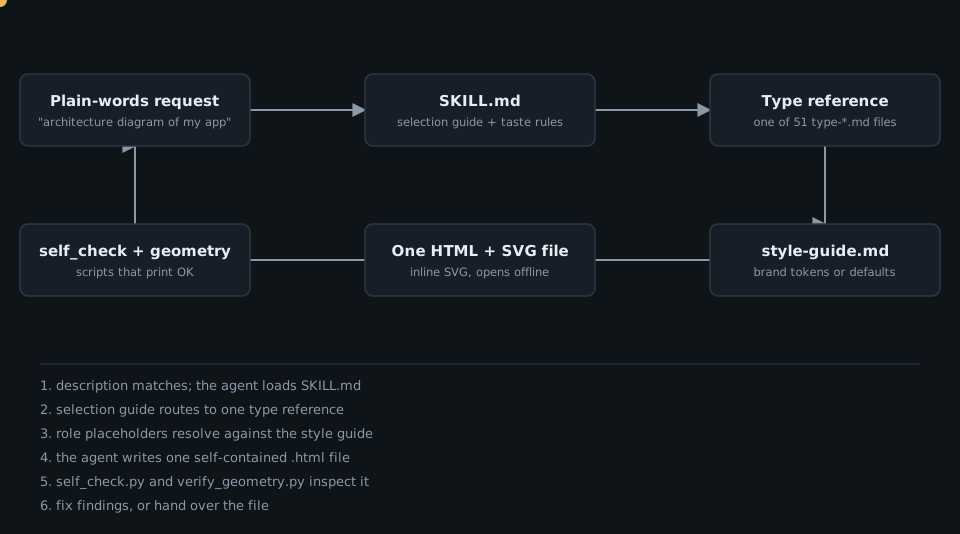
Architecture
The repo is a progressive-disclosure tree. The README says the agent sees only the skill name and description at startup, loads SKILL.md when a request matches, and pulls semantic, type and animation references only when relevant. A routine request loads SKILL.md, exactly one type reference, and at most primitives-core.md and layout-budget.md.
The same tree is wrapped for many hosts. Marketplace manifests for Claude, Codex, Factory Droid and Qoder sit beside one canonical skills/diagram-design/ directory; ADR 0008 records that native host manifests share one plugin root.
There are two tiers of checks. scripts/ at the repo root holds CI gates for contributors (lint-skin.py, lint-render.py, verify-docs-sync.py and many type-specific and cross-cutting verify-*.py gates). skills/diagram-design/scripts/ holds the distilled subset that ships inside the skill, so an installed agent can check its own output.
The core design idea
The key idea is that taste can be written as rules a machine can check. SKILL.md states the philosophy (“The highest-quality move is usually deletion”), then converts it into budgets: at most 9 nodes, 12 arrows and 2 coral elements per diagram, on a 4px grid, with no shadows. Above the budget the instruction is to split into two diagrams.
The second half of the idea is that prose rules that are not enforced rot. ADR 0005 explains why: nine shipped examples had labels partly covered by later-painted nodes, and every existing gate passed because none read coordinates. The decision was to turn the rule into a checker with adversarial tests: “A rule that only lives in prose is a rule that ships broken examples.”
The third piece is restraint about motion. ADR 0003 and animation.md make reveal the only sanctioned autoplay, and require a complete static frame for no-JS, print, export and reduced-motion. The skill’s own list of modes is none, reveal, step and loop, with a total of 8000ms at most.
Source excerpts. First, the geometry rule, stated in SKILL.md as mandatory connector rule 6:
<!-- skills/diagram-design/SKILL.md -->
6. **Mask before node.** A label mask must not overlap a node drawn after it;
   badge masks fully inside a node and masks over earlier zones are fine.
   ... verify with `python3 scripts/verify_geometry.py <file>`.
And the checker that enforces it. The thresholds are plain constants, and document order, not just overlap, decides whether a label is clipped:
# skills/diagram-design/scripts/verify_geometry.py
NODE_MIN_W = 60.0
NODE_MIN_H = 40.0
MASK_MIN_W = 20.0
MASK_MAX_W = 200.0
...
for node in nodes:
    if node.offset <= mask.offset:
        continue  # painted before the label; the label stays on top
self_check.py is deliberately dependency-free. Its docstring says it ships inside the skill so an installed agent can verify its own output, and verify() is a short list of independent passes appended to one error list:
# skills/diagram-design/scripts/self_check.py
check_document_completeness(source, errors)
check_css_references(parser, errors)
...
check_svgs(parser, errors)
check_viewbox(source, errors)
check_text_fit(source, errors)
check_scripts(parser, errors)
check_motion(parser, source, errors)
Finally, the export command shows how opinionated the contracts are about failure. It refuses rather than guesses:
<!-- commands/export-diagram.md -->
1. **No source path provided** → ask the user which `.html` file to export. Don't guess.
...
4. **PNG requested but Playwright not installed** → surface the install instruction from the reference verbatim and stop. Do **not** auto-install.
Takeaways
- A skill can be a design system: put the taste in reference files and the budgets in numbers, not adjectives.
- Load one thing at a time. Metadata first, then SKILL.md, then a single type reference keeps context small.
- Ship the verifier next to the skill. Checkers that an installed agent can run beat review comments after the fact.
- Write rules as checkers when the failure is invisible to other gates, and add adversarial tests for both polarities.
- Be honest about the trade-off: the README says the output is not an editable source format, so Mermaid still wins for docs that change every sprint in Git.
Work with me
Want your own team’s conventions turned into an agent skill with verification? Get in touch.
 Deep Dive: OpenAI's Performance Factory and the Agent Factory Pattern
Click to load Disqus comments