 Cui
firecrawl/firecrawl describes itself as “knowledge infrastructure to make your agents smarter”. The repo holds the self-hosted server (apps/api), SDKs, and Firecrawl Local (apps/local), a single Rust binary. This post is a source reading at commit 68291b7: I cloned the repo and read README.md, apps/local/README.md, apps/local/src/lib.rs, scrape.rs, guard.rs, netguard.rs and cloud.rs. Facts come from that code; interpretation is marked. The repo is AGPL-3.0 licensed.
Companion tutorial: how to install and use it is on Cui.Guru: Give your agent the web with Firecrawl Local.
The workflow in motion
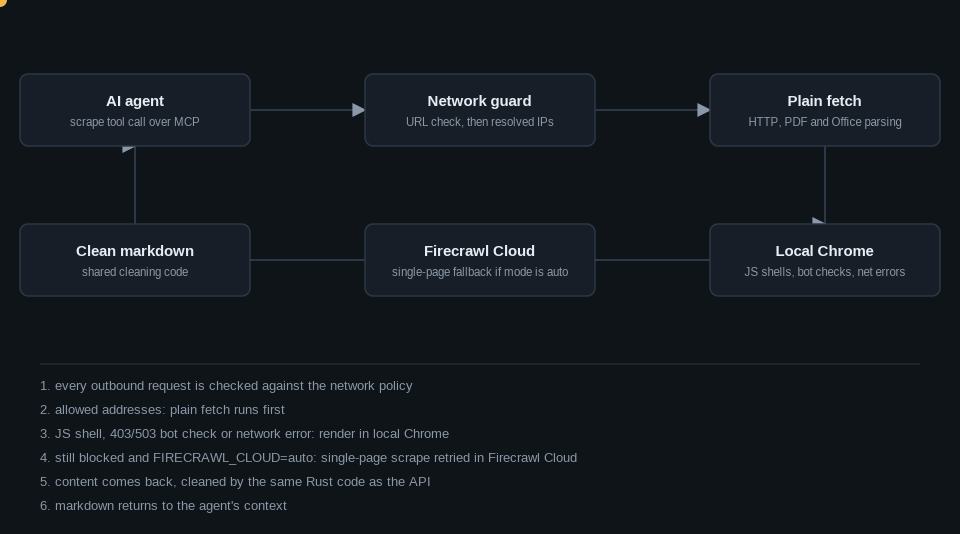
Architecture
The apps/local README lists the commands: scrape, crawl, map, serve, mcp, init, search, find-tools, data and login. Scraping, crawling, mapping and document parsing run on your machine; search, pages that refuse your machine, and Alexandria data providers go to Firecrawl Cloud.
The README says firecrawl-local mcp starts the local API on a loopback port and runs the firecrawl-mcp package against it. That is why scrape, crawl, map and batch scrape stay local while the other tools reach the cloud.
The core design idea
Interpretation: the default path is a ladder of increasing cost, with a security rule that holds on every rung. In auto mode a cheap HTTP fetch goes first. Per scrape.rs, local Chrome renders JavaScript shells, bot-checked pages and network-level fetch failures, and is used directly with --browser always, screenshots or waits. In cloud.rs, a single-page scrape is retried in Firecrawl Cloud only for recognised blocked responses or fetch failures and timeouts, and only when FIRECRAWL_CLOUD is auto. The search and off settings disable that fallback, and off keeps everything on your machine.
Three choices stand out in the source.
-
One cleaning codebase.
lib.rscompiles the HTML cleaning, link, metadata and crawl-filter modules straight fromapps/api/native/src, the same Rust the cloud API loads through N-API. A page cleaned locally and in the cloud goes through identical code. -
Guard twice, including the browser.
guard.rschecks every request once on the URL and once on the addresses DNS actually returned, which is what its header says defeats DNS rebinding. Chrome does its own networking, sonetguard.rsforces it through a loopback SOCKS5 proxy that applies the same policy to each connection it dials. -
Fail closed on config. An unrecognised
FIRECRAWL_CLOUDvalue means off, because “someone who set it was restricting the cloud, and a typo must not open it up”.
Source excerpts
The network policy, from apps/local/src/guard.rs:
pub enum NetworkPolicy {
  /// Public internet only. The default for `serve`.
  PublicOnly,
  /// Public internet plus loopback and private ranges. Link-local and cloud
  /// metadata addresses stay blocked. ...
  AllowPrivate,
}
The browser mode, from apps/local/src/scrape.rs:
pub enum BrowserMode {
  /// Plain fetch first; the browser only for pages that come back as an
  /// empty JavaScript shell, or when a screenshot or wait is asked for.
  Auto,
  Never,
  Always,
}
The fail-closed cloud setting, from apps/local/src/cloud.rs:
pub fn requested(raw: Option<&str>) -> Option<CloudMode> {
  let raw = raw.map(str::trim).filter(|r| !r.is_empty())?;
  Some(CloudMode::parse(raw).unwrap_or(CloudMode::Off))
}
Routing Chrome through the guard, from apps/local/src/netguard.rs:
/// The Chrome switches that send every connection through this proxy:
/// loopback included, no QUIC or other UDP path around it, and no DNS
/// lookups of its own.
pub fn chrome_args(&self) -> Vec<String> {
Takeaways
- Escalate cost on failure by default: plain fetch, then local Chrome, then (when enabled) the cloud for single-page scrapes.
- Apply the network policy to the address actually dialled, and to the browser too, not only to the URL you navigate to.
- Share one cleaning implementation between local and hosted modes so output matches.
- Make the privacy switch fail closed.
- For agents reading untrusted pages, the README suggests registering
firecrawl-local mcp --public-only.
Want help wiring web data into your own agents? Get in touch.
 Step-by-Step Guide: The Workflow Behind Shipping 100+ PRs a Week with Agents
Click to load Disqus comments