 Cui
Companion to the hands-on tutorial: Write your first Agent Skill the way Anthropic does on Cui.Guru. The tutorial shows the format. This post explains the design behind it.
anthropics/skills (189k stars when I read it) is Anthropic’s public repository of Agent Skills. Its README describes skills as folders of instructions, scripts and resources that Claude loads dynamically for specialized tasks. At the time of writing the skills/ folder holds 19 example skills, from pdf and docx to mcp-builder, webapp-testing and skill-creator. The format specification now lives at agentskills.io.
The workflow in motion
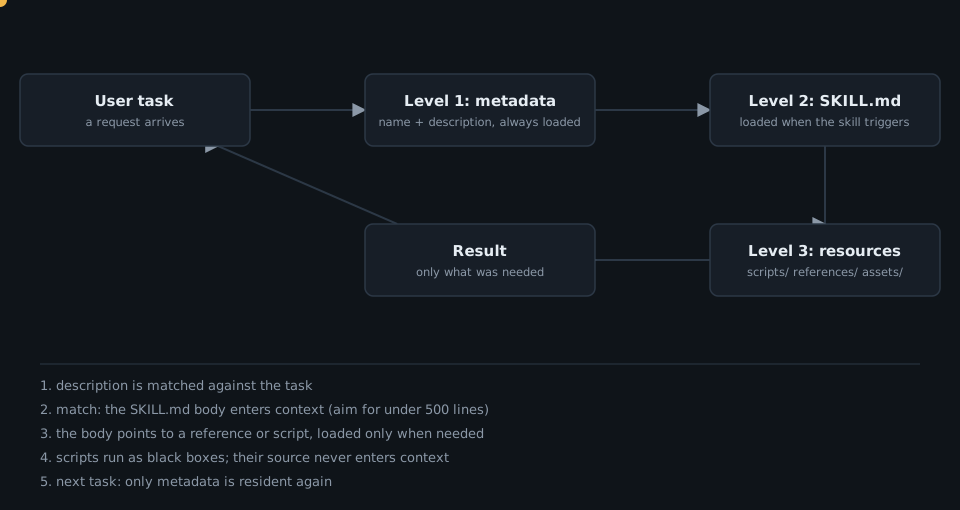
Architecture
The smallest valid skill is the repo’s own template:
---
name: template-skill
description: Replace with description of the skill and when Claude should use it.
---

# Insert instructions below
Two frontmatter fields, then free-form markdown. Everything else is optional structure, which skill-creator documents:
How the agent actually consumes a skill is the part worth internalizing. skill-creator calls it progressive disclosure, with three levels:
The numbers come straight from the repo’s guidance: metadata is about 100 words and always resident, the body should stay under roughly 500 lines, and bundled resources are unlimited because scripts can execute without being loaded. For large reference files (over 300 lines) it recommends a table of contents.
The core design idea: pay for context only when it pays back
A skill library could easily eat the context window if every skill were loaded up front. Splitting each skill into three levels means the standing cost per skill is one short description, which is also the only thing the agent uses to decide relevance. That makes the description the trigger, so it has to say both what the skill does and when to use it. skill-creator even includes a separate description-optimization step for triggering accuracy.
When a skill outgrows one file, you add a layer of hierarchy and point to it clearly from SKILL.md instead of growing the body.
Patterns worth copying from the reference skills
Scripts as black boxes. webapp-testing tells the agent to run its helper with --help first and to avoid reading the source unless a custom solution is truly necessary, because the scripts “can be very large and thus pollute your context window”:
python scripts/with_server.py --server "npm run dev" --port 5173 -- python your_automation.py
A decision tree in the instructions. The same skill routes the agent by situation instead of listing every option:
An evaluation loop for skills themselves. skill-creator drafts a skill, runs test prompts with and without it, reviews results (including an eval-viewer), rewrites, and repeats. Skills with objectively checkable output (file transforms, data extraction, fixed workflows) benefit most, while subjective ones such as writing style often don’t need test cases.
A disclaimer worth taking seriously. The README says these skills are for demonstration and education and should be tested in your own environment before you rely on them.
Takeaways for your own skills
- Write the description as a trigger: what it does and when to use it.
- Keep the body short and move detail into
references/, linked with guidance on when to read each file. - Put deterministic work in
scripts/and tell the agent to run, not read, them. - Teach with decision trees when there are several valid paths.
- Test with real prompts before you trust it.
Want a skill library designed for your product’s workflows? Talk to Cui.Guru.
 Deep Dive: How agent-browser Lets an Agent Drive Chrome with Snapshots and Refs

Click to load Disqus comments