 Cui
Companion to the hands-on tutorial: Drive a real browser from an AI agent with agent-browser on Cui.Guru. The tutorial shows the commands. This post explains why the design works.
vercel-labs/agent-browser (47k stars when I read it) is a native Rust CLI that gives an AI agent a browser it can drive one command at a time. Everything below comes from its README, its skill docs and its source under cli/src.
The workflow in motion
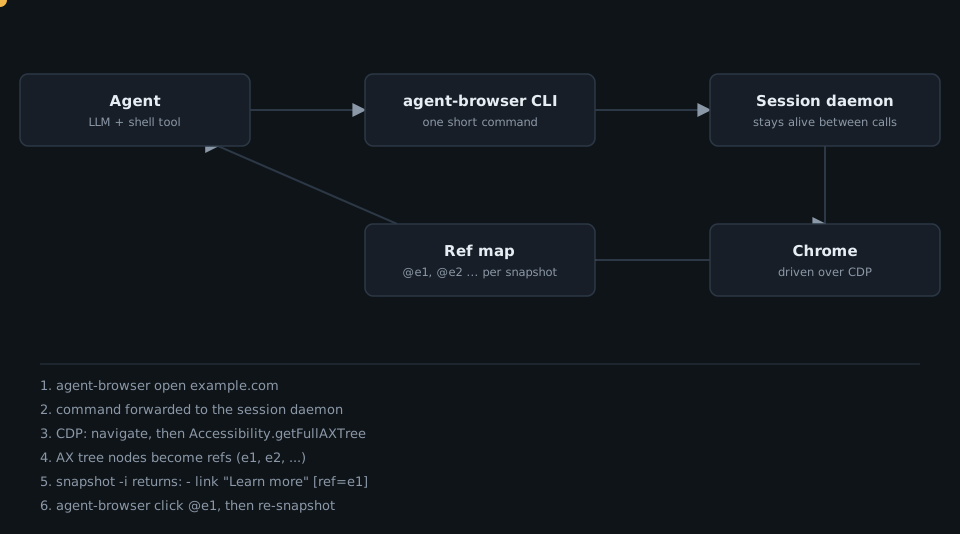
Each shell call is short. The state lives in a background daemon, not in the agent’s context.
Architecture
The README states the key facts: a background daemon starts on the first command and controls the browser over the Chrome DevTools Protocol, each --session gets its own daemon and browser, and by default a headless daemon exits after one hour without commands.
The pieces that matter in the source:
The core design idea: the page as a short, actionable list
The usual approach hands the model HTML and asks for a CSS selector. The repo’s snapshot reference contrasts the two: full DOM to selector to action is roughly 3,000 to 5,000 tokens, while a compact snapshot with refs is roughly 200 to 400 (the project’s own figures, not my measurement).
Three decisions make that work:
- Read the accessibility tree, not the DOM. It already encodes roles and names, which is how a person (or a screen reader) describes a page.
-
Only elements you can act on get a ref. In
snapshot.rs, a node gets a ref if its role is interactive (button, link, textbox, checkbox and so on), or it is a content role with a non-empty name, or the page reports it as cursor-interactive. - Refs are stable where they can be. A ref for the same backend DOM node in the same document is reused instead of reallocated.
// cli/src/native/snapshot.rs (trimmed)
let mut should_ref = if INTERACTIVE_ROLES.contains(&role) || TABLE_CELL_ROLES.contains(&role) {
    true
} else if CONTENT_ROLES.contains(&role) {
    !node.name.is_empty()
} else {
    false
};
if node.backend_node_id.is_some_and(|bid| cursor_elements.contains_key(&bid)) {
    should_ref = true; // cursor-interactive elements
}
// same file: allocate or reuse a ref
let ref_id = if let Some(existing) = ref_map.durable_ref(session_id, frame_id, backend_node_id) {
    existing.to_string()
} else {
    let allocated = format!("e{}", next_ref);
    next_ref += 1;
    ref_map.remember_durable_ref(session_id, frame_id, backend_node_id, &allocated);
    allocated
};
The lifecycle rules in references/snapshot-refs.md complete the picture. Same-document updates keep refs for surviving elements. Replaced elements and document replacements invalidate them, and invalidated IDs are never recycled within the session. If a node was replaced, the tool falls back to the single element with the same role and name, but only when that pair was unique in the snapshot. With duplicates it refuses to act, so the agent re-snapshots instead of clicking the wrong thing.
That last choice is the design philosophy in one line: fail loudly instead of guessing. The same principle shows up in the README: a click fails when the target is hidden, disabled, outside the viewport or covered by something like a consent banner.
Guardrails as data
Agents with a browser need limits. policy.rs implements an action policy loaded from a JSON file with default, allow, deny and confirm lists. The check order is the interesting part:
// cli/src/native/policy.rs (trimmed)
pub fn check(&self, action: &str) -> PolicyResult {
    if let Some(err) = &self.load_error {
        if action == "close" { return PolicyResult::Allow; }
        return PolicyResult::Deny(format!("action policy failed to load: {}", err));
    }
    if let Some(deny) = &self.deny {
        if deny.iter().any(|a| a == action) {
            return PolicyResult::Deny(format!("Action '{}' is denied by policy", action));
        }
    }
    if let Some(confirm) = &self.confirm {
        if confirm.iter().any(|a| a == action) {
            return PolicyResult::RequiresConfirmation;
        }
    }
    // then: the allow list, whose result depends on the policy's `default`
}
Deny beats confirm, confirm beats allow, and an unreadable or invalid-JSON policy file denies everything except close. With an allow list, whether unlisted actions are blocked depends on the policy’s default setting, so set "default": "deny" explicitly. Only the exact value deny is recognised, so a typo in that field silently falls back to allow.
Instructions that ship with the binary
The repo’s skills/agent-browser/SKILL.md is deliberately a thin discovery stub (frontmatter hidden: true). It tells the agent to run agent-browser skills get core, and the CLI serves guidance matching the installed version. The stub can never go stale because it contains no usage details. Specialized skills (Electron, Slack, dogfood, Vercel Sandbox and others) load the same way.
Takeaways for your own agent tools
- Return a compact, structured view of state and let the agent name targets by short handles.
- Keep session state out of the model’s context: one daemon per session.
- Prefer errors over best guesses when a handle is ambiguous.
- Make policy declarative, ordered, and fail-closed.
- Ship instructions from the tool, versioned with the tool.
Want these patterns applied to your own product? Talk to Cui.Guru.

Click to load Disqus comments