 Cui
Translation notice. This is an English translation of the Chinese WeChat article “登上GitHub Trending|腾讯开源 LoopForge” (“On GitHub Trending Tencent open-sources LoopForge”), published by the Tencent Technology Engineering (腾讯技术工程) official account on 17 Nov 2026. All credit for the ideas and the original content belongs to the authors at Tencent. The original figures are animated GIFs with Chinese labels. The diagrams below are my own English redraws as animated SVGs, so they are close in meaning but not pixel copies. Where the original table or lists are reproduced, the wording is mine. For the authoritative version, read the original and the LoopForge repository.
A single-machine coding agent writes code fast. But once it enters an R&D team, the same problems keep the team stuck at “individuals get faster, the whole group burns energy”: the laptop lid closes and the session stops, context fragments across people, Vibe Coding quality slips out of control, watching tickets every day eats time, and the same class of problem gets hit again and again.
To address this, the Tencent Lighthouse (轻量云) team built and open-sourced LoopForge, a cloud-based, self-evolving R&D platform. It combines a 24/7 cloud workspace, multi-role shared sessions, engineering-grade SOP pipelines, unattended automation and RSI self-evolution. The platform currently serves 20+ internal businesses and automatically delivers 200+ requirements and routine tickets per month. Drawing on DeepSeek’s recent Super-agent exploration, this article reviews the five engineering steps behind it.
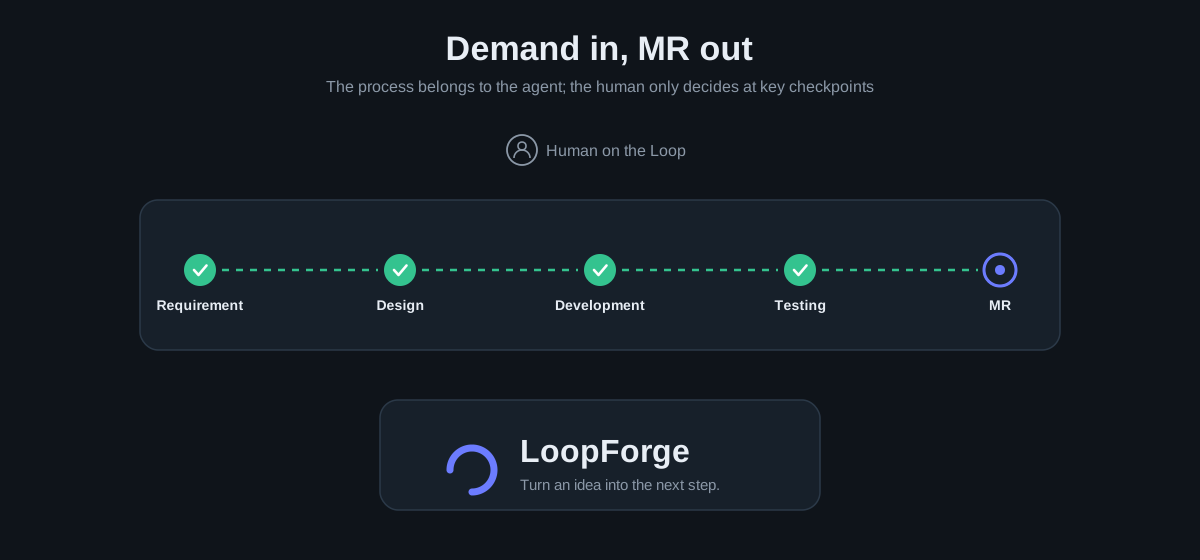
Figure: Demand in, MR out. The process is handed to the agent, and the human only decides at key checkpoints.
A few days ago, the DeepSeek team published “Super-agent Design Exploration: Toward More Autonomous Agent Systems” and open-sourced a research prototype. The opening of that article points at a pain that every heavy user of coding agents recognizes: models are already strong at single-task coding, but one person can only watch three to five sessions at once. The quality of a single task is limited by the model, while a team’s multi-task productivity is pinned down by human attention.
| Dimension | DSH Super-agent prototype | LoopForge |
|---|---|---|
| Core positioning | Async ticket-scheduling prototype for individuals or small teams | Cloud platform for multi-person collaboration and engineering delivery in R&D teams |
| Interaction and entry point | A shallow Router that only dispatches events and does not write code itself | Main Bot as pilot/co-pilot: small changes are coded and submitted as an MR directly; big requirements are dispatched to an SOP |
| Collaboration topology | One ticket is bound to one Worker that runs it end to end (cross-role collaboration is left as an open problem) | Product, design and engineering share one workspace in one session, with a five-layer decoupled multi-role SOP pipeline |
| Mid-run takeover | Mostly black-box background autonomy (how to step in or take over mid-run is left as an open problem) | The shared workspace can be paused, resumed or taken over directly at any time, with an online IDE and terminal for intervention |
| Quality and evolution | External Watchdog monitoring plus manual prompt tuning (long-horizon evolution is left as an open problem) | Inner loop: objective gates self-heal on the spot. Outer loop: engineering-grade RSI reviews each run, writes prescriptions and rewrites the SOP |
While building LoopForge (github.com/Tencent/LoopForge), we walked the same path of exploration. Looking back at the system’s evolution, we did not design a huge architecture on day one. We followed the pain points of real adoption in the team and crossed five hurdles one by one:
- Stage 1. Running agents locally, the session stops when the laptop closes → move to the cloud. Long tasks on a personal machine make you afraid to close the lid, and several branches in parallel can freeze it. We moved the workspace and execution environment to the cloud so it can run 24/7.
- Stage 2. People work in isolated windows and cross-role handoff relies on human relaying → move to a shared cloud. Each person chatted with their own bot, and requirements, designs and code context were copied and pasted back and forth. We converged on one shared session + one Main Bot + one cloud workspace, so the whole group collaborates at the same scene.
- Stage 3. Free-form Vibe Coding by many people has no quality backstop → design engineering-grade SOPs. Free chat is fast for small changes, but complex engineering work tends to “pretend to be done” or drift halfway. We broke role capabilities down into engineering-grade SOP pipelines with hard gates that a pilot/co-pilot can take over at any time.
- Stage 4. Routine chores and scattered issues still need a human to watch → trigger-driven unattended automation. If every task still needs a person to start it and watch its progress, attention gets chopped up by daily inspection and scattered tickets. We built scheduled and event-driven automation (for example the Issue auto-fix practice) so the background truly runs unattended.
- Stage 5. Static workflows have no memory and the same problems recur → engineering-grade RSI self-evolution. A hard-coded process makes the same mistake next time. We implemented an engineering-grade RSI loop that reviews and diagnoses after every run and generates prescriptions that rewrite SOPs, roles and gates, so the system gets smarter the more it runs.
Below, we walk through our engineering thinking and implementation in LoopForge, following these five stages in order.
PART 01. From a local agent to cloud 24/7 operation
Say goodbye to “the session stops when you close the laptop” by moving the workspace and execution environment to the cloud.
Whether it is Claude Code, Codex or CodeBuddy, everyone starts by opening a terminal on their own laptop to run an agent. For single-point features the experience is great. But once tasks get longer and more numerous, the physical limits of local execution show up immediately:
- The session stops when you close the lid. For a refactor or a full test run that takes half an hour, you do not dare to power off or disconnect. When you close the laptop after work, the task is simply interrupted.
- A heavy local environment limits concurrency. With three to five requirement branches open at once, ports collide and containers eat all the memory. A personal computer cannot carry many tasks in parallel.
- Switching machines loses the scene. Half-edited code, uncommitted branches and environment variables are all locked inside one personal computer. Switching devices, or asking a colleague to take a look, leaves nobody able to start.
So our first step was clear: move the agent’s workspace and execution environment fully to the cloud, so it runs 24/7 and no longer depends on a personal computer. For this, LoopForge builds a three-layer cloud runtime foundation:
- Isolated cloud workspaces, no local environment setup at all. Each task maps to its own cloud container or secure sandbox workspace. It can pull several frontend and backend repositories at the same time and automatically switch to the working branch. Coding, compiling, unit tests, integration and submitting the MR all happen in the cloud. You no longer start a dev environment locally. Close the laptop and leave work, and the task keeps running in the cloud to the end.
- Separated storage and compute, plus one-click onboarding of your own machines. In line with DeepSeek’s idea of decoupling the control plane from the execution environment, a workspace can run in platform-hosted cloud containers, or you can connect the team’s cloud hosts or idle dev machines to the platform with one click so they stay online 24/7 to take work. The execution environment is decoupled from the specific coding tool (you can freely switch among Claude Code, Codex, CodeBuddy and others). Repository credentials are injected temporarily by a gateway according to identity and erased automatically when the task ends, so the model never sees a plaintext secret.
- Automatic snapshot and hibernation, lossless wake-up at any time. Being online 24/7 does not mean burning compute 24/7. When a cloud workspace is reclaimed after idling, or when work moves across machines, the system automatically packs uncommitted code changes and branch state into a cloud snapshot. When you come back the next day and continue the conversation, the system restores the full code scene from the snapshot.
PART 02. From a personal machine to team-shared context
Product, design and engineering collaborate in the same session around one Main Bot.
Once agents could run in the cloud 24/7, usage soon moved from “personal use” to “team use”. That is where we hit the second wall: if everybody still talks to an agent in their own isolated window, the team’s context remains fragmented.
The product manager has an agent organize the requirements in her own window, and the designer produces a design draft. When it reaches engineering, the background, repository branch and design constraints must be pasted again into that person’s agent. Single-point coding got faster, but the team is still slow in carrying context across roles. And if, to share context, you simply pull a pile of bots into a group chat for free-form conversation, messages flood the channel, contexts pollute one another, and in a multi-person conversation, granting write access makes it easy for someone’s casual remark to mislead the agent into an unauthorized operation.
To let the team truly share one scene in the cloud, we did two things.
1. Shared session + Main Bot + cloud workspace
We gave up the noisy multi-bot group chat and insisted on: “one conversation binds to exactly one cloud workspace at a time, and only one Main Bot serves the whole group.” Each task corresponds to one team-shared session. Product, design and engineering enter the same session and talk to the Main Bot. When members take turns speaking, the underlying layer automatically continues the same session context, and the operations act on the same real workspace behind it.
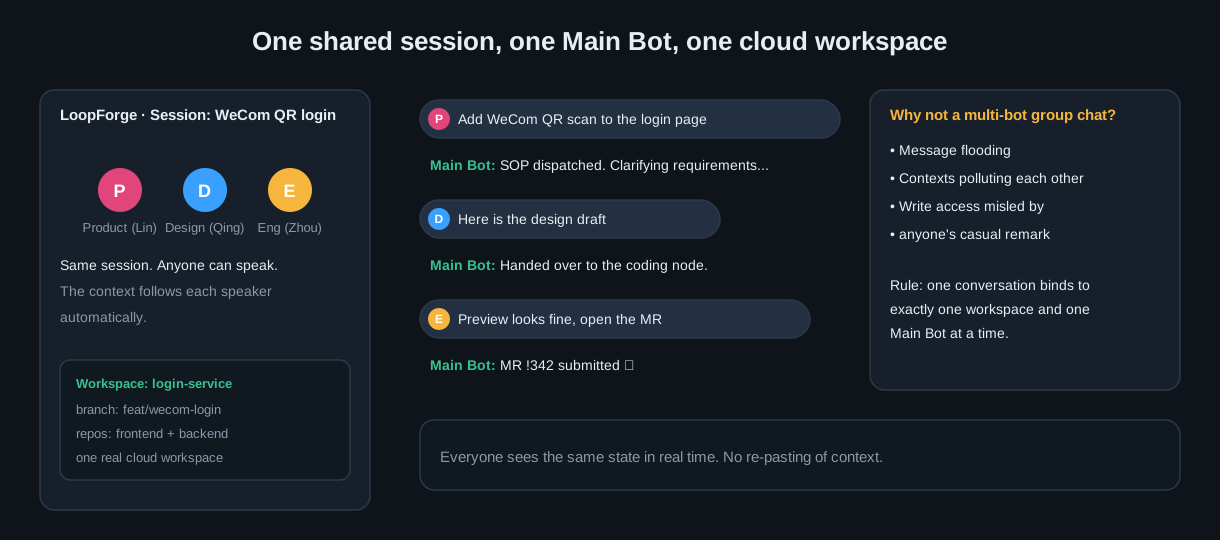
Figure: Product, design and engineering are in the same session and talk to the same Main Bot.
For everyday requests such as changing a line of copy, tweaking a style or fixing a small bug, any member can simply tell the Main Bot in the shared session. The Main Bot opens the cloud workspace on the spot, edits the code, runs verification and submits an MR in one click. The whole group sees it in real time with no secondary syncing.
2. An independent reviewer model approves on your behalf + three permission levels
Tiered permissions remove the mechanical “confirm” clicks in a multi-person shared session, while strictly preventing other people’s remarks from triggering unauthorized actions.
The original problem: every write operation was blocked by a pop-up, so finishing one task meant a dozen confirmations. But turning on full automation in a multi-person shared conversation risks someone else’s casual remark misleading the agent into executing a high-risk command.
Our approach: everyday greetings, read-only code queries and solution discussions finish directly in natural language. When an operation changes code, runs commands or submits an MR, it is released precisely according to three permission modes:
- Confirm every time (safe and controlled). Any modifying operation generates a draft that awaits confirmation. After a human confirms it, execution continues to the next step automatically.
- Smart approval (risk self-review). Before each code edit, command run or MR submission, an independent reviewer model with no tools and no credentials evaluates both the operation’s risk and the authorization intent of the current initiator. It strictly isolates other members’ remarks and prompt injection, so no one else’s words can authorize the current operator’s action. Routine operations are approved automatically, and high-risk or unauthorized operations are handed to a human to confirm.
- Fully automatic (efficient pass-through). Within the authorized scope, everything runs in order in one go. It is forced to stop for confirmation only when a destructive-conflict warning appears.
As a result, routine reads, writes and verification commands pass in seconds, approved by the independent reviewer model, and a human is asked only for out-of-bounds or high-risk changes. Product, design and engineering collaborate smoothly in one cloud context, while the permission-safety floor for shared use is preserved.
PART 03. From free-form conversation to engineering-grade SOPs
A five-layer standard + pilot/co-pilot takeover + engineering-grade RSI self-evolution.
Once product, design and engineering could all Vibe Code around the Main Bot in one cloud shared session, small changes felt very smooth. But in formal iterations that cross roles and run along a long chain, the quality-out-of-control problem of free-form Vibe Coding erupted all at once.
Pain point 1. Casual process, “pretending to be done”, no hard engineering gates. In free conversation, everyone gives one modification request, and the agent follows the context and edits wildly. There are no standard checkpoints for clarification, design, review and testing. The agent often claims “it’s fixed” while it has not even gotten the build or unit tests to pass.
Pain point 2. Cross-role handoff relies on chat history, so context bloats and details get lost. As a long conversation rolls on, the boundary conditions agreed upstream are buried in dozens of chat turns, and downstream coding often misses edits. As DeepSeek’s ablation experiments verified, relying on a prompt alone to make one agent delegate subtasks on its own degrades into doing the work by itself once it meets a complex long tail.
Pain point 3. Drifting mid-run is hard to take over, and the same pitfalls are stepped on repeatedly (no controlled intervention, no experience accumulation). When a task drifts halfway, forcibly cutting into the conversation tends to wreck the scene. And an environment trap or a convention problem that took two hours to fix this time gets hit again, exactly the same, in the next requirement’s Vibe Coding.
We realized that small changes can win on typing speed with Vibe Coding, but serious R&D delivery must solidify professional role capabilities and team engineering standards into SOPs (standard operating procedures) with hard gates. In LoopForge we upgrade free-form Vibe Coding into an engineering-grade SOP pipeline through three core designs.
1. Five-layer decoupled standards: turn expert capability into an asset
Instead of gambling on ad-hoc prompts, at the architecture level we split professional role capability and SOP flow into five independent standards:
- Role (role capability definition). Independently encapsulates the responsibilities, coding conventions, dedicated skills and objective verification gates of roles such as architect, frontend, backend and tester.
- SOP flow (cross-role topology). Defines the dependency order of nodes such as clarification, design, coding and testing, their parallel branches, and the failure send-back and redo paths.
- Execution engine (underlying tool adapter). Freely switch among coding tools such as Claude Code, Codex and CodeBuddy, so role capability is decoupled from the specific tool.
- Runtime environment (cloud sandbox foundation). Binds a persistent cloud container, a secure sandbox or the team’s own machine to provide a consistent execution environment.
- Deliverable contract (stage handoff standard). Specifies the structured artifacts required at each handoff between upstream and downstream nodes and keeps the complete version history.
These professional role assets are shared by the whole group. A formal requirement can be chained directly into an SOP pipeline that flows automatically (each node loads only the norms and skills of that role and automatically shields the messy personal local configuration in the repository). In daily shared conversations, a member can also @ an expert role at any time for an independent, read-only consultation, get architecture or review advice and sync it to the Main Bot for coordination. So professional capability is shared, and nobody interrupts when they should not.
2. A three-layer pilot/co-pilot order: autopilot with takeover at any time
Introducing SOPs does not mean humans lose the sense of control. We converge collaboration into a “human ↔ Main Bot ↔ SOP node” three-layer pilot/co-pilot structure that can advance or retreat:
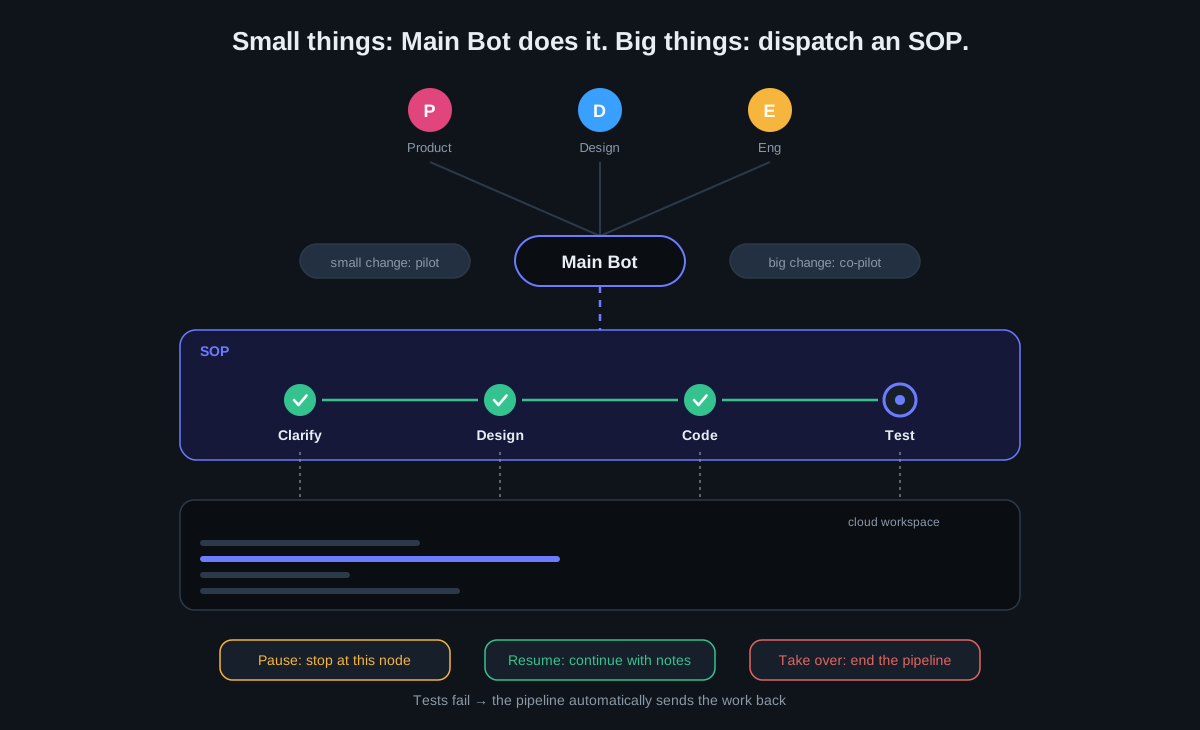
Figure: For small things the Main Bot edits and submits the MR directly. For big things it dispatches an SOP that can be paused, taken over and resumed at any time, and failing tests are sent back automatically.
While an SOP is running automatically, the node pipeline is shown live above the shared session, and clicking any node shows its reasoning and execution log. If you find the direction has drifted, you do not need to interject at the bottom layer. Besides editing directly in the online editor or terminal, just tell the Main Bot, and you can take over in a controlled way in three ways:
- Pause and intervene. Let the pipeline stop safely at the current node, then have the Main Bot or an engineer edit files and run commands to verify.
- Resume. After the edit, resume the pipeline with a note about the change, handing control back to the later nodes to finish testing and delivery.
- Take over directly. Terminate the remaining pipeline and take over the results already in the workspace. After the edit, the Main Bot pushes straight to the original branch to open or update the MR.
3. Engineering-grade RSI: gate self-healing + review-driven self-evolution
The frontier of AI keeps exploring RSI (Recursive Self-Improvement). But in a real R&D team, retraining model weights is neither realistic nor fast enough. What we actually landed is engineering-grade RSI: the system’s execution traces feed back into the system’s own SOPs, role specs and verification gates, forming an evolution flywheel of “execute → objective check → review and diagnose → rewrite the process → more accurate next round”.
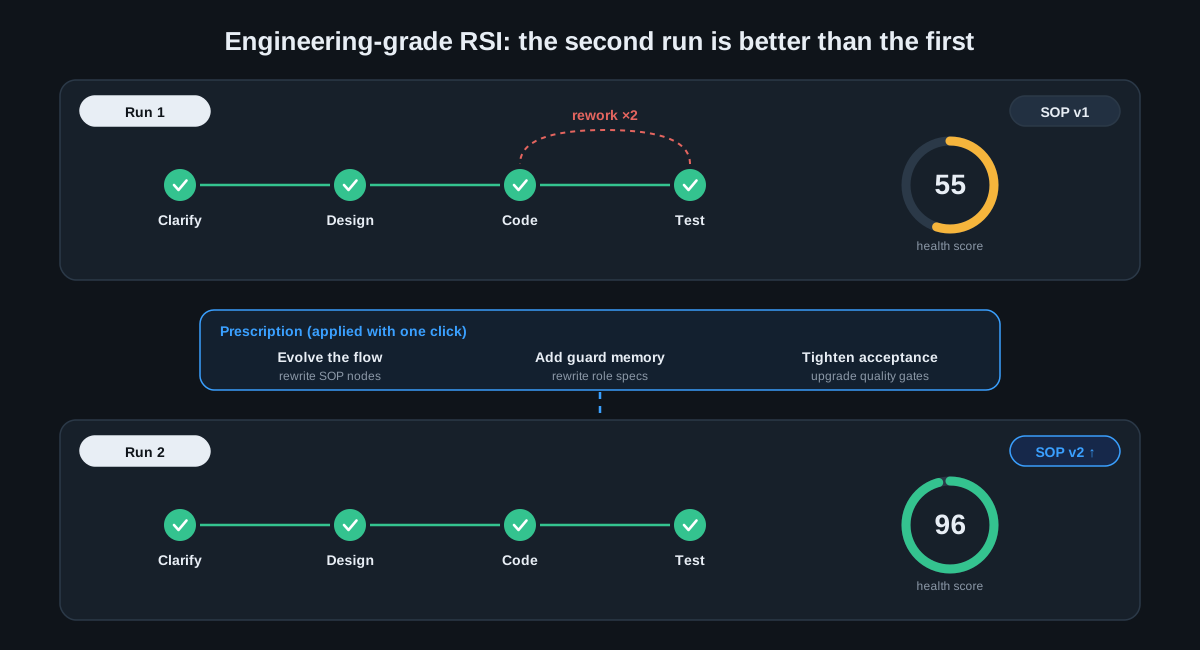
Figure: In the first run there are two reworks and a score of 55. After the review writes a prescription and adds a new gate, the second run passes in one go with a score of 96.
1. The inner loop within a single run (objective gates self-heal on the spot). In the past, the agent would claim “it’s fixed” purely on subjective feeling after writing code, and when an error appeared a human had to paste the log back for it to redo. Now every SOP node has built-in objective verification gates such as compilation, unit tests and code style. If a gate fails, the work is never released. The agent takes the real error and enters an error-correction loop to fix it on the spot (with a retry cap to prevent endless loops), eliminating low-level mistakes inside the node.
2. The outer loop across runs (recursive review and asset self-evolution). A traditional pipeline is static, so a pitfall hit this time will be hit again next time. In LoopForge, whenever an SOP run ends, the review engine automatically traces the full chain (time spent per node, failed gates, ineffective repeated attempts and the reasons for rework), gives a 0 to 100 health score, and lets the agent write structured “improvement prescriptions” for the SOP and roles:
- Evolve the flow: rewrite SOP nodes. For steps that tend to stall or spin, automatically adjust the retry cap, the failure fallback path and the repair strategy.
- Add guard memory: rewrite the role. Distill the lessons of this pitfall and its boundary constraints, and append them automatically to the corresponding role’s specification.
- Tighten acceptance: rewrite the quality gate. For the defect types that slipped through, automatically add or upgrade objective verification gates for the role to block the same class of problem.
On the interface, a human only needs to review the prescription and click “Apply in one click”. The system then rewrites the corresponding SOP or role asset automatically and produces a new version. Within a single run, the inner loop gets the code right. Across runs, the outer loop makes the process stronger. Every pitfall the team hits today becomes the default instinct of the whole R&D pipeline tomorrow.
PART 04. Scheduled tasks and full-chain Issue automation
Let everyday bugs and issues queue up, get fixed and open MRs automatically in the background.
After the first three steps, when the team works on key requirements it already has a cloud workspace, a shared session and a high-quality SOP pipeline. But any real system in fast iteration keeps producing, beyond the mainline big requirements, a steady stream of online bugs, experience blemishes, technical debt and scattered issues every day.
Handling these daily issues used to cost a great deal of time and people. Each problem looks small, but they are numerous and fragmentary. Engineers spend a lot of energy every day reading tickets in the backlog, claiming them, pulling branches, locating and fixing, running tests and opening MRs. Even with SOPs, if dozens of scattered issues still require someone to create a session for each one, trigger it, watch its progress and resolve merge conflicts, the core engineers’ uninterrupted flow is still shattered.
Our thinking was this: since the SOP already has standardized repair and verification capabilities, why not let the system itself patrol and pull tickets, queue and fix bugs, and deliver merged code to a person? But in pushing the mass of daily issues toward full automation, we had to solve three real engineering blockers:
- High cost of manually watching and dispatching tickets. Defects and experience problems are scattered across the requirement platform and code repositories. Manually patrolling them and copying context to start an agent is itself heavy mechanical labor.
- Fixing many issues in parallel easily causes collisions and conflicts. When a dozen bug tickets finish in the background at the same time and merge into the same target branch, code conflicts happen frequently, and in the end engineers still have to be pulled back to cut branches and resolve conflicts by hand.
- A few stuck tickets can block the whole automated pipeline. In batch automatic processing, if one or two complex issues stop at a key gate waiting for human confirmation and keep holding the background execution resources, all the daily tickets behind them are blocked.
For this reason, in the fourth stage we built a scheduled-patrol and full-chain Issue automation system that turns the digestion of a flood of daily bugs and scattered requirements into an “unattended background pipeline”:
- Scheduled automatic ticket pulling and two-way sync: newly filed bugs enter the fix pipeline automatically. Through scheduled jobs connected two ways to the requirement platform and the code repository, the system patrols the backlog on a cycle for newly filed bugs and issues, automatically matches the corresponding fix SOP by label, and starts a cloud workspace to locate and fix. Stage status during execution and the final MR link are written back to the original ticket automatically, so engineers no longer create tickets, dispatch them or shuttle statuses by hand.
- Automatic merging into the integration branch and conflict self-healing: parallel tickets no longer need a human to merge code. When several issues of the same batch finish in parallel and need to be merged into the integration branch, the system merges them in order. On a code conflict, nobody has to rush back to a local machine. The system extracts the conflict context, sends it back to the SOP’s repair and verification nodes to resolve it itself, reruns the compile and unit-test gates, and generates one consolidated MR only after everything passes.
- Proactive health patrols and approval suspension with zero blocking: 24/7 throughput without stalling. Besides passively fixing tickets, the team can configure scheduled patrol jobs (for example a daily code-health scan, dependency security checks, and automatic investigation of build failures) so the agent generates a fix proposal directly when it finds a hazard. Meanwhile, any ticket in the pipeline that needs a human decision enters the “Waiting for my confirmation” queue and releases its background execution resources at that very instant, never blocking the automatic digestion of the large batch of daily issues behind it. The mass of small daily tickets is silently cleared in the background around the clock, and a person only has to click final acceptance in a coffee break.
SUMMARY. Five steps from a personal tool to a self-evolving organization
Looking back at LoopForge’s evolution, if we borrow the autonomous-driving L1 to L5 scale to measure how deeply an R&D team has adopted agents, these five steps happen to outline a clear engineering path of progression:
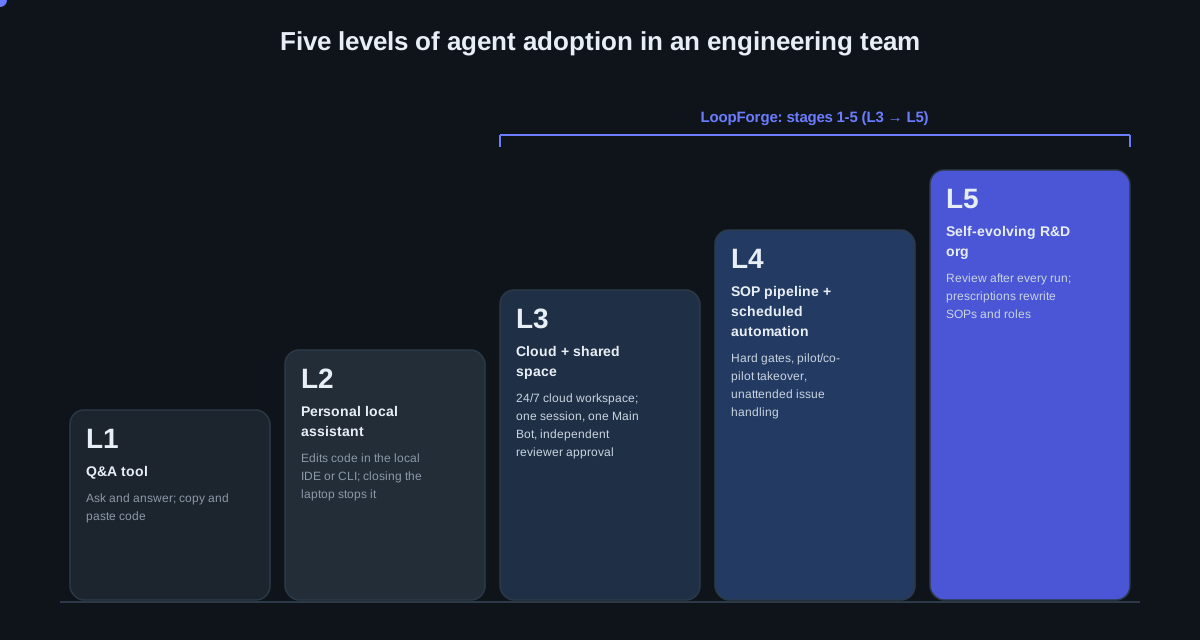
Figure: From a local single-machine tool to cloud sharing, SOP autonomy and a self-evolving organization.
- L1. Q&A tool. Ask one question, get one answer, code moves by copy and paste, and it ends when you close the window.
- L2. Personal local assistant. It can edit code in a local IDE or CLI, but the environment and context are locked inside a personal computer, and closing the laptop stops everything.
- L3. Cloud operation and a team shared space (stages 1 and 2). The workspace moves to the cloud and runs 24/7. Product, design and engineering connect to the same Main Bot in one shared session, working efficiently together with an independent reviewer model approving on their behalf.
- L4. Engineering-grade SOPs and scheduled automation pipelines (stages 3 and 4). Standardized SOPs, pilot/co-pilot takeover at any time and objective quality gates replace disorderly Vibe Coding, and scheduled ticket pulling plus automatic conflict resolution on the integration branch deliver unattended.
- L5. Self-evolving R&D organization (stage 5, engineering-grade RSI). After each run it automatically computes R&D efficiency and reviews the root causes of rework, then writes improvement prescriptions back into SOPs and role definitions in one click, so the organization’s process gets smarter the more it runs.
Looking back at the whole exploration, our biggest takeaway is this: making an agent a reliable colleague in an R&D team has never been about writing a longer prompt, nor about pulling together a lively multi-bot group chat. It is about converting “human engineering experience” into “the system’s operating order”.
In the single-machine era we treated AI as a handy co-pilot and chased the instant thrill of writing a beautiful piece of code. But once it truly enters the team’s engineering scene, the bottleneck quickly shifts from “can the model write code” to whether the environment will drop, how context is aligned, how quality is backstopped, and how people are freed from tedious scheduling.
The five steps we walked are in essence a process of turning “dependence on people” into “engineering mechanisms” again and again. We used cloud workspaces to untie the physical bonds of the personal computer. We used shared sessions and independent reviewer approval to bridge cross-role communication gaps. We used SOPs with objective gates to contain the loss of control of free-form Vibe Coding. We used scheduled automation to run unattended in the background. And finally we used engineering-grade RSI to review across runs so the whole system evolves by itself. When the lessons of every pitfall are automatically settled into the next run’s gates and norms, what we gain is no longer just a few bots that can write code, but an R&D system that truly belongs to the team and evolves itself every day.
OPEN SOURCE. Try it and support it
LoopForge is now officially open source. We have opened up the complete implementation of cloud workspace scheduling, multi-person Main Bot shared sessions, five-layer standard SOP orchestration, objective-gate self-healing, scheduled and full-chain Issue automation, and engineering-grade RSI review and evolution, hoping to give peers exploring team-level AI R&D adoption an engineering foundation they can pick up and customize.
If you have also been bothered by “the agent skipped the tests again this time”, or you want your team’s AI R&D to need less repeated explanation and accumulate more experience, open https://loopforge.cn/demo/ now to browse the platform’s real interface and delivery records, or clone the repository and run bash scripts/install.sh to deploy a LoopForge of your own team and run through your own delivery process.
If LoopForge helps you, you are welcome to give it a Star on GitHub, and to submit Issues and PRs to help define how software is delivered in the AI era.
- GitHub repository: https://github.com/Tencent/LoopForge
- Official site: https://loopforge.cn
- Live platform preview: https://loopforge.cn/demo/
Scan the QR code below to join the LoopForge discussion group. [Translator’s note: the QR code is not reproduced.]
English translation of the Chinese original published by Tencent Technology Engineering. Diagrams are my own English redraws of the original animated figures. Please refer to the original article for the authoritative text.
 Deep Dive: How AG-UI Turns Every Agent into One Typed Event Stream
Click to load Disqus comments