 Cui
google-labs-code/stitch-skills is a library of Agent Skills for the Stitch MCP server. This post is a source reading of the repo at commit 62fdcd6: I cloned it and read the plugin manifests and the SKILL.md files under plugins/. Facts come from that code; interpretation is marked.
Companion tutorial: how to install and use it is on Cui.Guru: Build web pages from Stitch designs with stitch-skills.
The workflow in motion
Architecture
The repo is organised as three plugins, each with a plugin.json and a skills/ folder: stitch-design, stitch-build and stitch-utilities. A root .agents/plugins/marketplace.json named stitch-skills lists them with local source paths. Skills follow the Agent Skills layout: SKILL.md, then scripts/, resources/, examples/.
code-to-design is an orchestrator skill. Its text says it “orchestrates three other skills in sequence”: extract-static-html, extract-design-md and upload-to-stitch. Composition happens purely by prose: one SKILL.md tells the agent to read another. Its detailed steps also delegate to manage-design-system to upload DESIGN.md before the HTML upload.
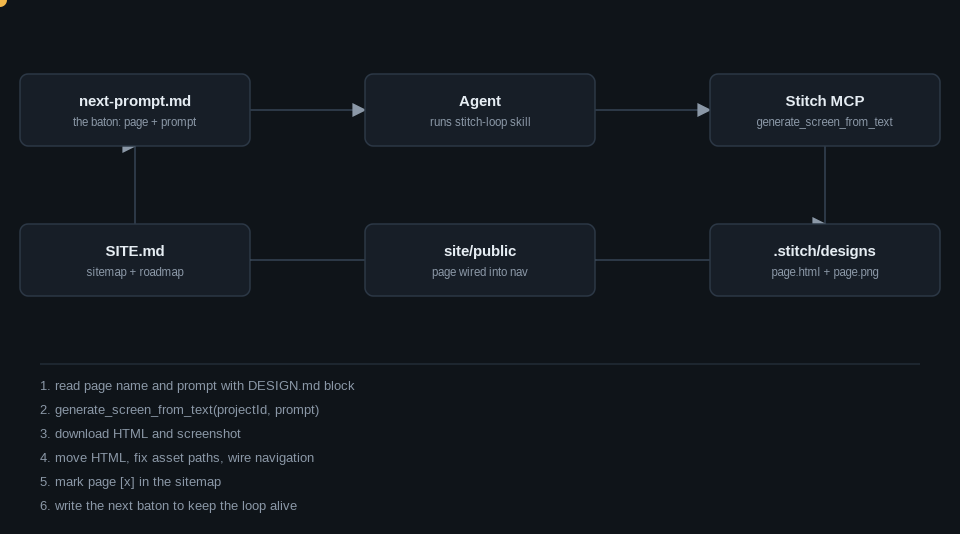
State lives in files, not in the agent. The stitch-loop skill lists the layout: .stitch/metadata.json (project and screen IDs, “persist this!”), DESIGN.md, SITE.md, next-prompt.md and a designs/ staging folder.
The core design idea
An agent run is stateless, so the loop externalises its memory into three small files with distinct jobs. The baton says what to build now. SITE.md says what exists and what is next (its own header calls it the project’s “Long-Term Memory”). DESIGN.md says how it must look. This is my reading, but the skill text supports it: the baton rules say the prompt “must include the design system block from .stitch/DESIGN.md” and “You MUST update this file before completing your work to continue the loop.”
The skill is deliberately agnostic about what restarts the agent. Its orchestration table lists CI/CD, a human in the loop, agent chains and manual re-runs, and says “focus on the pattern, not the trigger mechanism.”
Design constraints are also written as human-readable text. design-md states that Stitch “interprets design through Visual Descriptions supported by specific color values”, so the design system is prose plus hex codes rather than code.
Code excerpts
The baton format, from plugins/stitch-utilities/skills/stitch-loop/SKILL.md:
---
page: about
---
A page describing how jules.top tracking works.

**DESIGN SYSTEM (REQUIRED):**
[Copy from .stitch/DESIGN.md Section 6]
The page field determines the output filename.
The upload helper, upload-to-stitch/scripts/upload_to_stitch.py, exists because of a model limit. Its docstring says MCP tool-call arguments are part of the model’s output, so re-emitting a large base64 file would be truncated. The script posts directly instead:
url = f"{api_url.rstrip('/')}/v1/projects/{project_id}/screens:batchCreate"
...
headers={
    "Content-Type": "application/json",
    "X-Goog-Api-Key": api_key,
},
That is the pattern: let the model decide, and let a script move the bytes.
A human gate is also written into the skill text. manage-design-system says that before uploading a design system the agent “MUST pause and ask the user for confirmation” and “Do NOT upload until the user confirms.”
Takeaways
- A skill library can be mostly Markdown: instructions and tool-call tables, with scripts for deterministic work such as HTML extraction and large uploads.
- Persist loop state in files (baton, sitemap, design system, metadata) so any agent can resume.
- Compose skills by naming them in prose, as
code-to-designdoes. - Put confirmation checkpoints in the skill text before irreversible uploads.
Want an agent pipeline like this built for your team? Get in touch.
 Deep Dive: Gemini Tool Retrieval, Deferred Tool Schemas for Agents
Click to load Disqus comments