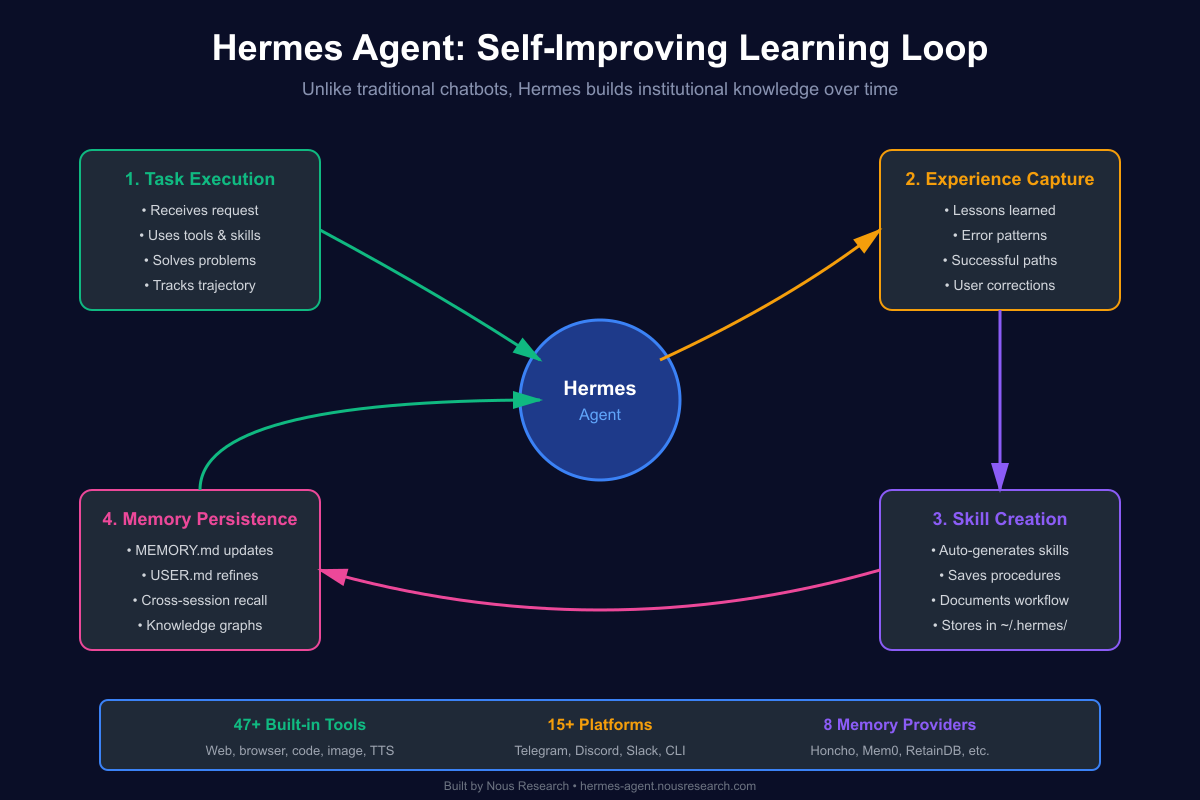
Most AI assistants are glorified chatbots — they answer questions, forget everything when you close the window, and start fresh every session. Hermes Agent is different. It’s an autonomous AI that actually learns from experience and gets more capable over time.
Built by Nous Research (the team behind the Hermes language models), this isn’t just another wrapper around an API. It’s a self-improving agent with a closed learning loop, persistent memory, and the ability to run anywhere — not just on your laptop.
What Makes Hermes Agent Different?
1. True Learning Loop
Hermes doesn’t just execute tasks — it learns from them:
- Creates skills from experience: After solving a complex task, it saves the approach as a reusable skill
- Self-improves during use: Skills evolve as the agent discovers better patterns
- Persistent memory: Remembers your preferences, environment facts, and lessons learned across sessions
- Cross-session recall: Full-text search across all past conversations with AI summarization
# After helping you deploy a complex Kubernetes setup,
# Hermes automatically creates a skill for future k8s deployments
# Next time, it knows exactly what worked
2. Runs Anywhere, Not Just Your Laptop
Unlike coding copilots tethered to an IDE or chatbots that need your laptop running:
- 6 terminal backends: Local, Docker, SSH, Daytona, Singularity, Modal
- Serverless options: Daytona and Modal hibernate when idle — costs nearly nothing
- Remote control: Talk to it from Telegram while it works on a $5 VPS you never SSH into
# Install on a cheap cloud VM
curl -fsSL https://raw.githubusercontent.com/NousResearch/hermes-agent/main/scripts/install.sh | bash

# Connect via Telegram and forget about it
# The agent keeps working even when your laptop is closed
3. Lives Where You Do
One agent, 15+ communication platforms:
- CLI: Traditional terminal interface
- Messaging: Telegram, Discord, Slack, WhatsApp, Signal
- Enterprise: Matrix, Mattermost, Email, DingTalk, Feishu, WeCom
- Mobile: SMS, BlueBubbles (iMessage)
- IoT: Home Assistant integration
Set it up once, access it everywhere.
4. Memory System That Makes Sense
Hermes maintains bounded, curated memory that persists across sessions:
| File | Purpose | Limit |
|---|---|---|
MEMORY.md |
Agent’s personal notes (environment, conventions, lessons) | ~800 tokens |
USER.md |
Your profile (preferences, communication style) | ~500 tokens |
# MEMORY.md example
User runs macOS 14 Sonoma, uses Homebrew, has Docker Desktop.
Shell: zsh with oh-my-zsh. Editor: VS Code with Vim keybindings.
§
Project ~/code/api uses Go 1.22, sqlc for DB queries, chi router.
Run tests with 'make test'. CI via GitHub Actions.
§
The staging server (10.0.1.50) needs SSH port 2222, not 22.
Key is at ~/.ssh/staging_ed25519.
Why bounded? Strict limits keep the system prompt focused. When memory fills up, the agent consolidates entries — exactly like human memory works.
Beyond local memory, Hermes supports 8 external memory providers including Honcho, Mem0, and RetainDB for knowledge graphs and semantic search.
5. Skills System: Procedural Memory
Skills are reusable knowledge documents that the agent loads on-demand. Think of them as procedures the agent can recall when needed.
Progressive disclosure pattern minimizes token usage:
Level 0: List all skills (~3k tokens)
Level 1: Load full skill content when needed
Level 2: Load specific reference files if required
Skills can be:
- Bundled — shipped with Hermes
- Hub-installed — from official registries, skills.sh, or well-known endpoints
- Agent-created — automatically generated when the agent discovers a non-trivial workflow
# Install skills from multiple sources
hermes skills install official/security/1password
hermes skills install skills-sh/vercel-labs/json-render/json-render-react
hermes skills install openai/skills/k8s

# Skills become slash commands
/1password get my-secret
/k8s deploy --namespace prod
The agent creates new skills after:
- Completing complex tasks (5+ tool calls)
- Finding the working path after hitting errors
- Learning from your corrections
- Discovering non-trivial workflows
6. Built for Research & Production
Hermes isn’t just a productivity tool — it’s research-ready:
- Trajectory export: Log all actions for RL training
- Batch processing: Run experiments at scale
- Atropos integration: Built-in RL training support
- 47 built-in tools: Web search, browser control, image generation, TTS, code execution
- MCP support: Connect to Model Context Protocol servers for extended capabilities
7. Security That Doesn’t Get in the Way
- Command approval system: Review risky commands before execution
- Container isolation: Run in Docker or Singularity for safety
- Skill security scanning: All hub-installed skills checked for data exfiltration, prompt injection, destructive commands
- Environment variable passthrough: Skills can declare required secrets securely
Quick Start
Installation (60 seconds)
# Linux / macOS / WSL2
curl -fsSL https://raw.githubusercontent.com/NousResearch/hermes-agent/main/scripts/install.sh | bash

# Reload shell
source ~/.bashrc  # or: source ~/.zshrc

# Start chatting
hermes
The installer handles everything: Python, Node.js, dependencies, config, and LLM provider setup.
First Conversation
# One-shot question
hermes chat -q "What tools do you have available?"

# Interactive session
hermes

# Check status
hermes status

# Run diagnostics
hermes doctor
Set Up Messaging (Optional)
# Configure Telegram, Discord, or other platforms
hermes gateway setup

# Enable cron for scheduled tasks
hermes cron add "0 9 * * 1" "Summarize last week's GitHub activity"
Real-World Use Cases
1. DevOps Automation
# Teach Hermes your deployment process once
# Next time, just say "deploy to staging"
# It remembers: git hooks, environment vars, health checks, rollback procedures
2. Research Assistant
- Monitors RSS feeds, blogs, arXiv papers
- Summarizes findings and posts to Slack
- Builds a searchable knowledge base over time
3. Code Review Bot
# Spawn in a temp directory for PR review
hermes spawn reviewer --task "Review PR #123 for security issues"
4. Personal Assistant
- Manages calendar, email, reminders
- Learns your preferences (meeting times, communication style)
- Remembers context from months ago via session search
5. Home Automation
- Integrates with Home Assistant
- Creates automations based on patterns it observes
- “Turn on the lights when I get home” → learns your schedule
Architecture Highlights
Delegate & Parallelize
# Spawn isolated subagents for parallel work
hermes spawn --task "Analyze this dataset" &
hermes spawn --task "Generate report charts" &
# Both run simultaneously, results merge at the end
Programmatic Tool Calling
# Multi-step pipelines collapse into single inference calls
execute_code("""
import requests
data = requests.get('https://api.example.com/data').json()
# Process, transform, save — all in one go
""")
Context Files
Shape agent behavior with workspace-specific files:
-
SOUL.md— Define personality and tone -
AGENTS.md— Agent architecture and delegation rules -
TOOLS.md— Environment-specific notes (camera names, SSH hosts) -
MEMORY.md— Long-term memory (auto-managed)
Skills Hub Ecosystem
Hermes integrates with multiple skill sources:
| Source | Example | Notes |
|---|---|---|
| official | official/security/1password |
Shipped with Hermes, builtin trust |
| skills.sh | skills-sh/vercel-labs/agent-skills/vercel-react-best-practices |
Vercel’s public directory |
| well-known | well-known:https://mintlify.com/docs/.well-known/skills/mintlify |
URL-based discovery |
| GitHub | openai/skills/k8s |
Direct repo installs |
| ClawHub | clawhub:agent-skills/productivity |
Community marketplace |
# Browse all sources
hermes skills browse

# Search specific source
hermes skills search react --source skills-sh

# Inspect before installing
hermes skills inspect skills-sh/vercel-labs/json-render/json-render-react

# Install with security scan
hermes skills install openai/skills/k8s

# Check for updates
hermes skills check
hermes skills update
Why It Matters
Most AI tools are stateless — they help you solve a problem, then forget everything. Hermes is stateful. It builds institutional knowledge about your environment, your preferences, your workflows.
Over weeks and months, it becomes genuinely more useful. Not because the underlying model improved, but because it learned from working with you.
This is what autonomous agents should be: tools that get smarter through experience, not just through model updates.
Getting Started
-
Install:
curl -fsSL https://raw.githubusercontent.com/NousResearch/hermes-agent/main/scripts/install.sh | bash - Docs: hermes-agent.nousresearch.com/docs
- GitHub: github.com/NousResearch/hermes-agent
- Models: Nous Portal, OpenRouter, or any OpenAI-compatible endpoint
Built by the team behind Hermes, Nomos, and Psyche language models. Not just another chatbot wrapper.
 Harness Engineering: Anthropic's Practical Guide to Building Production AI Agents
Click to load Disqus comments