 Cui
Companion to the hands-on tutorial: Build a tool-using agent loop with Claude Quickstarts on Cui.Guru. The tutorial shows how to use it. This post explains why it is built this way.
anthropics/claude-quickstarts (about 20.8k stars when I read it) is a collection of projects for building applications with the Claude API. Its agents/ folder is described as “a minimal educational implementation of LLM agents” and “NOT an SDK, but a reference implementation of key concepts”. The README claims the core logic is under 300 lines. The core idea it states: sophisticated behaviour emerges from “LLMs using tools in a loop”.
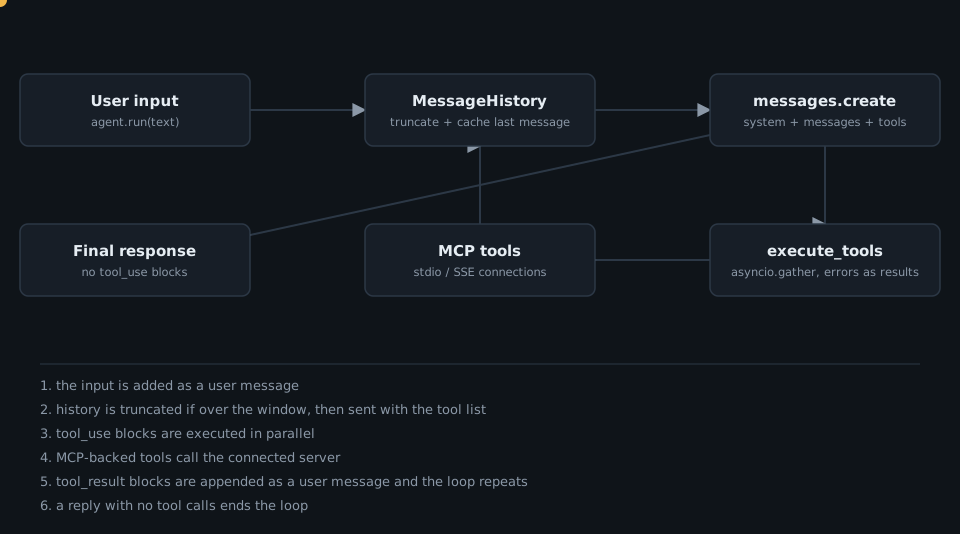
The workflow in motion
Architecture
Three parts, as the README lists them: agent.py (API calls and tool execution), tools/ (native and MCP tools) and utils/ (history and MCP connections).
The core design idea
The whole agent is one while True. There is no planner and no state machine: the model decides, through tool_use blocks, whether it needs another turn. From agent.py:
tool_calls = [
    block for block in response.content if block.type == "tool_use"
]
...
if tool_calls:
    tool_results = await execute_tools(tool_calls, tool_dict)
    await self.history.add_message("user", tool_results)
else:
    return response
Everything else exists to keep that loop alive: a uniform tool contract, errors that do not break it, history truncation to manage context growth, and a way to import tools from elsewhere.
A tool is a name, a description and a schema
tools/base.py is the whole contract (abbreviated here):
@dataclass
class Tool:
    name: str
    description: str
    input_schema: dict[str, Any]

    def to_dict(self) -> dict[str, Any]:
        return {"name": self.name, "description": self.description,
                "input_schema": self.input_schema}

    async def execute(self, **kwargs) -> str:
        raise NotImplementedError(...)
The agent sends to_dict() for each tool and calls execute(**call.input) on the match. The bundled ThinkTool shows how small a tool can be: it appends nothing and returns "Thinking complete!"; its value is that the model gets a place to reason.
Failures become results
utils/tool_util.py runs tool calls in parallel by default with asyncio.gather, and converts problems into tool_result blocks the model can read:
except KeyError:
    response["content"] = f"Tool '{call.name}' not found"
    response["is_error"] = True
except Exception as e:
    response["content"] = f"Error executing tool: {str(e)}"
    response["is_error"] = True
History is bounded and cache-friendly
MessageHistory (utils/history_util.py) tracks tokens from API usage (including cache read and creation tokens). When total_tokens exceeds context_window_tokens, truncate() removes the oldest message pairs and puts a "[Earlier history has been truncated.]" notice at the front. format_for_api() marks the content blocks of the last message with cache_control: {"type": "ephemeral"} when caching is enabled, so the growing prefix can be cached between loop turns.
MCP tools are wrapped as ordinary tools
utils/connections.py builds a stdio or SSE connection from a config dict, lists the server’s tools and wraps each as an MCPTool, a Tool subclass whose execute calls the server (tools/mcp_tool.py). The loop never knows the difference. Agent.run_async adds the MCP tools for one run inside an AsyncExitStack and restores the original tool list in a finally block, so connections do not outlive the call.
Server-side tools follow another path: WebSearchServerTool and CodeExecutionServerTool only emit Anthropic’s server-tool dictionaries (types web_search_20250305 and code_execution_20250522); Anthropic runs them rather than this loop. The loop also sends an anthropic-beta: code-execution-2025-05-22 header by default, which message_params["extra_headers"] can extend.
Takeaways
- An agent is a loop: call the model, run its tool calls, feed back results, stop when there are none.
- Keep the tool contract tiny (name, description, JSON schema, async
execute) so anything can be a tool, including MCP servers. - Return errors as
is_errorresults so the model can recover. - Budget context explicitly and mark the tail for prompt caching.
- The README is honest that this lacks production features; treat it as a reading exercise and port the shape to your stack.
Want a production-grade agent loop built for your product? Talk to Cui.Guru.
Click to load Disqus comments