 Cui
Companion to the hands-on tutorial: Let your coding agent debug a live Chrome page with chrome-devtools-mcp on Cui.Guru. The tutorial shows how to use it. This post explains why it is built this way.
ChromeDevTools/chrome-devtools-mcp (about 57k stars per the GitHub API on 2026-11-16, Apache-2.0, TypeScript, package version 1.13.0) is described as “Chrome DevTools for coding agents”: it lets an agent control and inspect a live Chrome browser, as an MCP server and as a CLI. I read the source from a fresh clone. The interesting part is not the Puppeteer calls; it is how a browser with enormous surface area is turned into something an LLM can use safely and cheaply.
The workflow in motion
Architecture
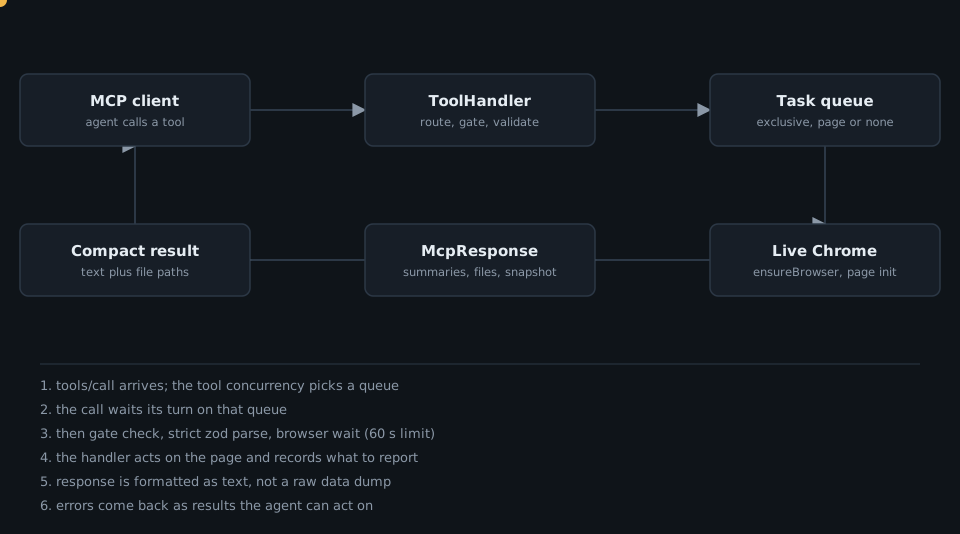
src/tools/ holds one file per capability area (pages.ts, input.ts, network.ts, performance.ts, snapshot.ts, memory.ts, lighthouse.ts and more). Each exports tool factories built with defineTool or definePageTool; createTools in src/tools/tools.ts assembles them from the parsed server arguments. src/ToolHandler.ts wraps each definition and runs calls; src/McpContext.ts owns browser and page state plus the task queues; src/McpResponse.ts (about 2,000 lines) turns what a handler recorded into the text the agent reads.
The core design idea
The repo states its stance in docs/design-principles.md, and the code follows it. The principles, in the doc’s own words: Agent-Agnostic API, Token-Optimized (“LCP was 3.2s” is better than 50k lines of JSON; files are the right location for large amounts of data), Small Deterministic Blocks (composable tools, not magic buttons), Self-Healing Errors, Human-Agent Collaboration, Progressive Complexity, and Reference over Value (heavy assets return a file path or resource URI, not raw data).
Each principle shows up as a concrete mechanism.
Tools are declarations, not scripts
A tool is an object with a zod schema, annotations and a handler that never returns data directly; it tells the response what to include. From src/tools/snapshot.ts:
// src/tools/snapshot.ts
export const takeSnapshot: PageToolFactory = definePageTool(() => ({
  name: 'take_snapshot',
  description: `Take a text snapshot of the target page based on the a11y tree. ... Prefer taking a snapshot over taking a screenshot.`,
  annotations: { category: ToolCategory.DEBUGGING, readOnlyHint: false },
  schema: { verbose: zod.boolean().optional(), filePath: zod.string().optional() }, // describe() text omitted
  blockedByDialog: true,
  concurrency: 'page',
  verifyFilesSchema: { filePath: true },
  handler: async (request, response) => {
    response.includeSnapshot({ verbose: request.params.verbose ?? false, filePath: request.params.filePath });
  },
}));
The description steers the model toward the cheap text snapshot over a screenshot, and filePath lets large output go to disk instead of the context window. This is Reference over Value in practice.
Concurrency is part of the tool’s contract
ToolDefinition.ts documents a ToolConcurrency type with three values:
// src/tools/ToolDefinition.ts
export type ToolConcurrency = 'exclusive' | 'page' | 'none';
// 'exclusive': the context queue, for the whole call. No other browser tool runs at the same time.
// 'page': the queue of the page named by pageId, a child of the context queue.
// 'none': no queue. For browserless tools and page tools that only read state.
ToolHandler#queueFor maps the value to a TaskQueue; McpContext creates the root taskQueue and a per-page queue via pageTaskQueue(pageId). With page-ID routing enabled, calls on different pages can run together, while anything touching browser-global state waits for everything. A tool such as list_pages is declared exclusive; take_snapshot is page.
Gate, validate, then act
Before a handler runs, ToolHandler checks that the tool is enabled for the current mode and category flags (a disabled tool returns an actionable message naming the flag to enable), parses arguments with a strict zod object, then waits for the browser under a 60-second limit:
// src/ToolHandler.ts
export const TOOL_CALL_TIMEOUT_MS = 60_000;
File arguments go through validateToolFiles, which resolves them with context.validatePath. A comment in validateAndResolvePathOrUrl explains a subtle case: new URL() accepts http://x/../../etc/passwd, so a filesystem-path parameter that looks like an http or ws URL is rejected outright unless the tool explicitly sets allowUrl. Security is encoded per parameter in verifyFilesSchema.
Errors are results
When a handler throws, #runBrowserTool does not crash the MCP call: it catches the error, calls response.setError(...), and still formats a response. Messages are written for the agent, for example the disabled-tool text: “Tool … is currently disabled. Enable it by running chrome-devtools start …”. That is the Self-Healing Errors principle: the failure carries its own fix.
Progressive complexity through flags and a slim mode
The regular tool surface spans many categories (the generated tool reference lists, for example, Input automation with 10 tools, Memory with 14 and Network with 2), and some categories are opt-in. Capability categories are switched with --category* flags, and --slim replaces the whole set with a tiny one. docs/slim-tool-reference.md lists just navigate, evaluate and screenshot; isAvailableInMode makes the two sets mutually exclusive.
Takeaways
- Define tools declaratively (schema, annotations, concurrency, file-path policy) and keep handlers thin; a central handler can then enforce gating, validation, queues and timeouts uniformly.
- Make concurrency explicit per tool. A shared browser needs serialisation, but page-scoped tools do not have to wait for each other.
- Send agents summaries and file paths, not raw dumps. The project’s design doc makes this a rule, and the
filePathparameters implement it. - Return errors as readable results with the next step included.
- Offer a slim surface for simple jobs; fewer tools means less for the model to choose from.
Want agents that can see and debug your web product? Get in touch.
 Deep Dive: How msitarzewski/agency-agents Turns 283 Markdown Personas into a Multi-Tool Agent Team
Click to load Disqus comments